
Is the site worth buying? Answer it with your own costs, not a rate per square metre
Every builder-developer runs this in a spreadsheet, and the spreadsheet's weakest number is always the build cost — a rate per square metre from a job three years ago. You already price work properly. The feasibility uses the estimate you have built, and keeps using it as the estimate changes.
Available on the Developer plan — not in the free trial

The build cost is the biggest number and the worst guess
On a six-townhouse site the build is usually two thirds of the money. A spreadsheet carries it as a rate per square metre, which makes the whole feasibility an estimate of an estimate — and the only way to improve it is to redo it by hand.
Here the build line is linked to the estimate. Price the job properly once and the feasibility picks that figure up and keeps it. Re-price a trade, accept a variation, and the margin moves with it.
Before an estimate exists you can still type a rate times an area, and swap it for the real estimate later. Nothing else in the feasibility has to be redone.
What a development is
An ordinary SmarteBuild job with a development record attached. It keeps its estimates, schedule, orders and documents — the Developer plan adds the feasibility, the sales and the land details on top.
Start a feasibility on a site you do not own yet and the job is created behind the scenes. Turn any existing job into a development with one click. Nothing about your other jobs changes.
Stamp duty and land tax, worked out for your state
Transfer duty and land tax are where feasibilities quietly go wrong, because the rates are fiddly, they differ in every state, and the land tax depends on what else you own. Both are calculated for you, and each suggestion shows its working and where the rate came from.
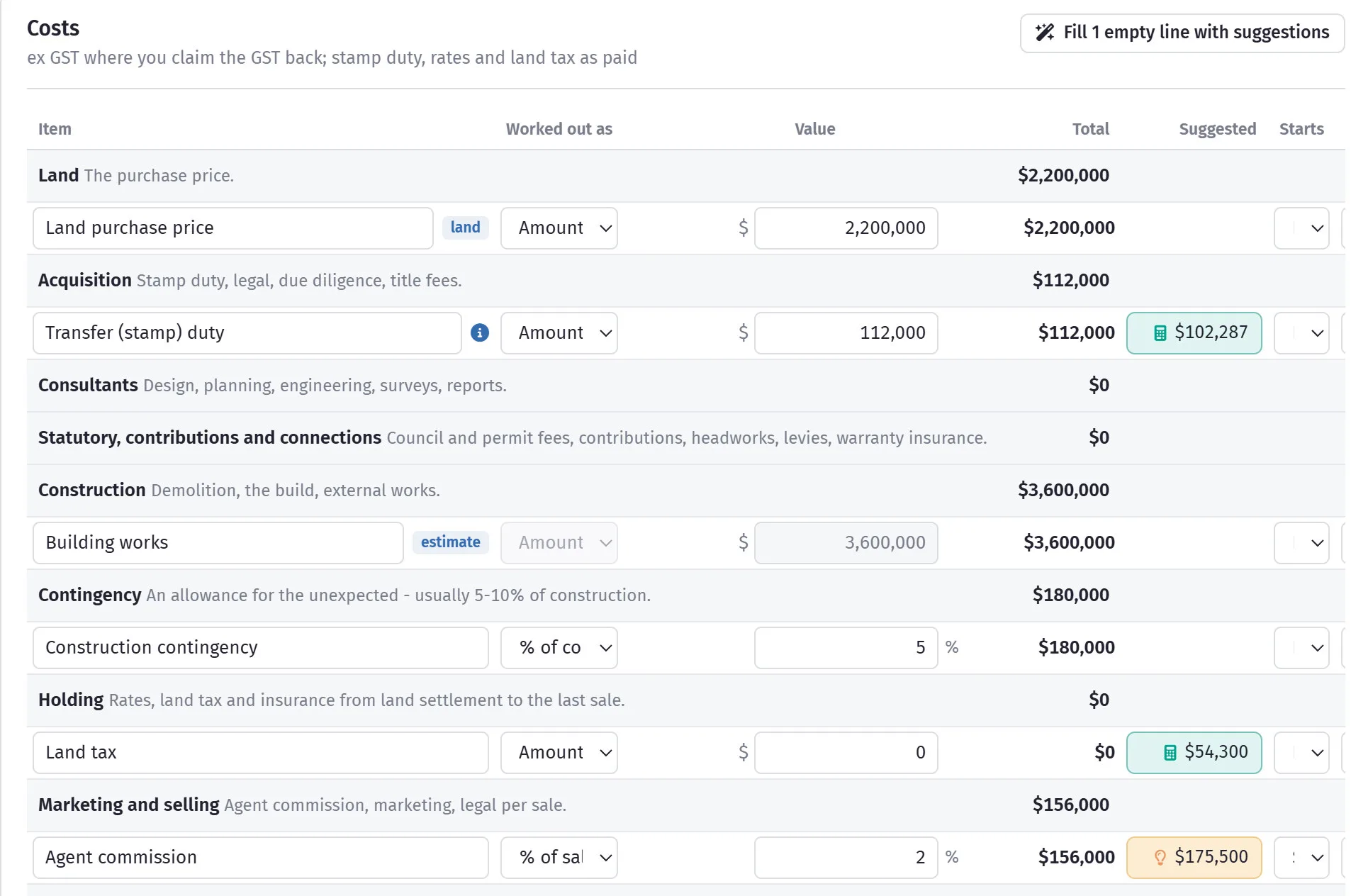
Duty is worked out at your state's general rates, including the per-$100 rounding, the flat bands and the foreign purchaser surcharge. Land tax is the extra tax this land adds on top of what you already hold in that state — as a company, as individuals or in a trust — multiplied by the number of assessment dates that fall between settlement and the last sale. The ACT taxes each property on its own; the Northern Territory has none.
Everything else gets a typical figure rather than a calculated one: contingency, architect, planner, surveyor, certifier, home warranty, agent commission at the state median, marketing, legal per sale, loan establishment. One button fills every line still sitting at zero, and leaves anything you have typed alone. Council rates get no suggestion at all, because every council sets its own and a made-up number is worse than a blank.
A suggestion is a starting point, not advice. Rates change — they are dated on screen, and re-checked each July. Your accountant still signs off the tax.
A feasibility without time is a guess with decimals
Two sites with the same profit are not the same investment if one takes eighteen months and the other thirty. Every line here carries when the money moves, not just how much.
A start and a spread
Each line starts at land settlement, at build, or a number of months after, and goes out all at once, evenly, or on an S-curve — slow, fast, then slow, the way building spend actually behaves.
Or the job's own programme
Once the job has a schedule, the build line can follow the schedule's cash flow instead of a curve, so the feasibility and the programme cannot drift apart.
Sales land when they settle
Each lot comes in at its expected settlement month, or its real date once it is in the sales register. The 10% deposit can count on exchange or wait for settlement, because in most states it sits in trust.
Rent while you wait to sell
Houses let until a buyer comes along, or an old building rented until demolition: add the rent from the phase it starts in, with an allowance for empty weeks and the agent's fee taken off. A grant or salvage goes in as one-off income in the month it arrives.
Interest on what you actually owe
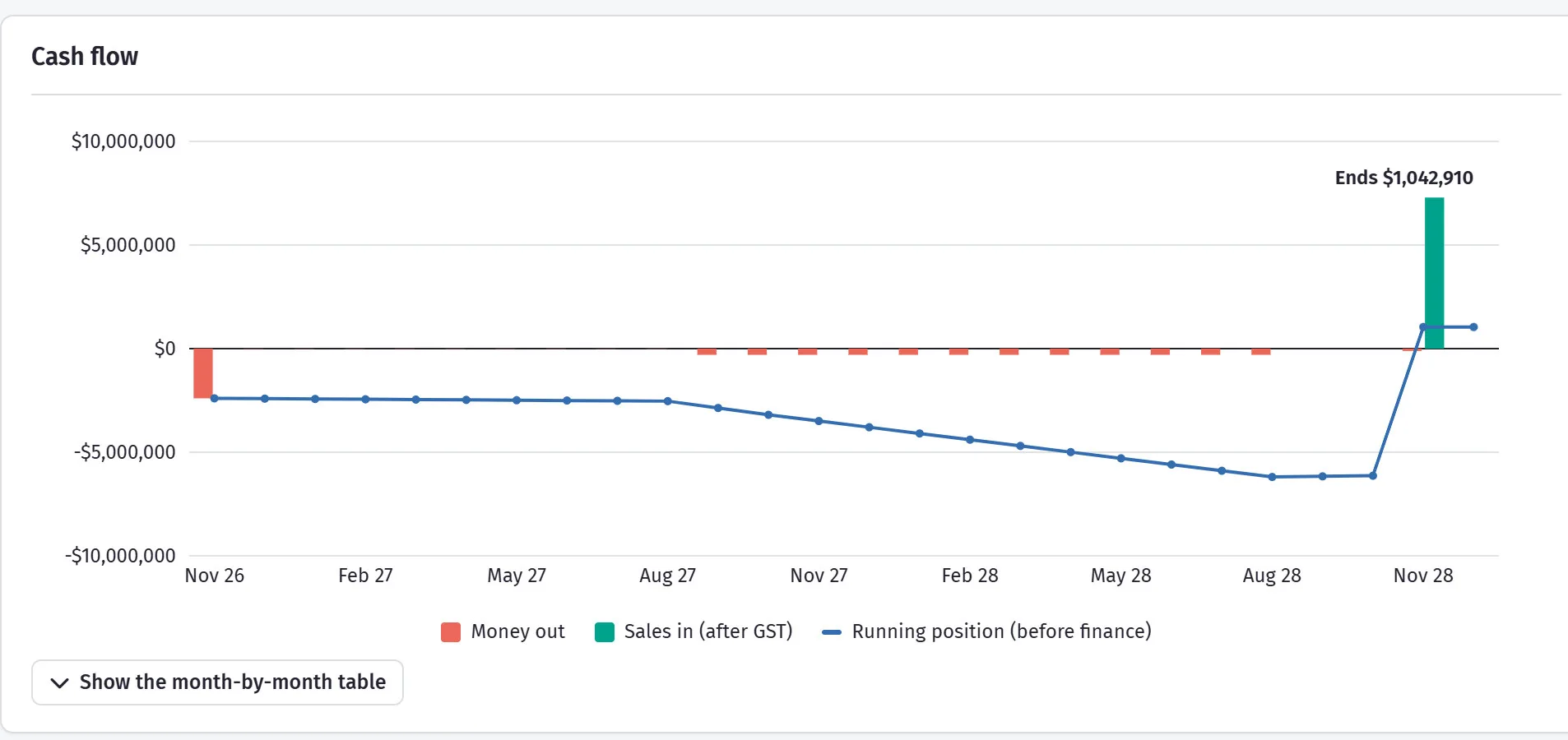
Equity goes in first, then the loan, with interest worked out on the real balance each month and added to it. Not the “half the loan for half the time” rule a spreadsheet uses, which understates the finance cost on every job that runs long. Funded by two lenders? Add a second, dearer loan and it starts only once the first is full — and the first is paid off first when the sales come in.
Thirteen figures, and the two you negotiate on
A bank asks for margin on cost. A partner asks what they earn on their money. You need to know what you can pay for the land. All of it comes off the same monthly cash flow, so the screen, the PDF and the portfolio can never disagree.
- Profit and margin
- Before and after interest, against the target margin you set — green, amber or red.
- Profit after income tax
- Underneath the profit, the same figure after tax at the rate you set — a first estimate, not tax advice.
- Residual land value
- The most you can pay for the land and still hit your target. This is the number that answers “should I buy it?”
- Break-even sale price
- The lowest average price per lot before the job stops making money, and how far prices can fall.
- Project and equity IRR
- The yearly return on all the money in the job, and the return on your own cash after the bank is paid.
- NPV
- The profit in today’s dollars at your required return. Above zero means it beats that return.
- Peak debt and peak equity
- The most the bank is owed, and the most of your own cash tied up at once — in which month.
Where a figure cannot honestly be worked out — an IRR on cash that never turns positive — the screen says so instead of printing a number.
Six townhouses or eight units, side by side
A site rarely has one answer. Copy the feasibility, change the yield, the build cost or the programme, and you have a second scenario on the same land. Put them side by side — two of them, or every one you have built — and the differences are listed for you: profit, margin, peak loan, IRR and what you could pay for the land under each.
One of them is the chosen scenario. That is the one the developments list reports, the one the cash flow across every site adds up, and the one the approvals screen measures the programme against. The others stay where they are, so the question you have already answered does not have to be answered again.
When a scenario is the one you took to the bank, lock it. The locked version is kept as it was, and every later change is measured against it, so “what did we say we would do” has an answer that is not somebody's memory.
Eight units sells for $920,000 more and earns $55,000 less. That is the question the spreadsheet never quite answers.
One set of numbers, printed for whoever is asking
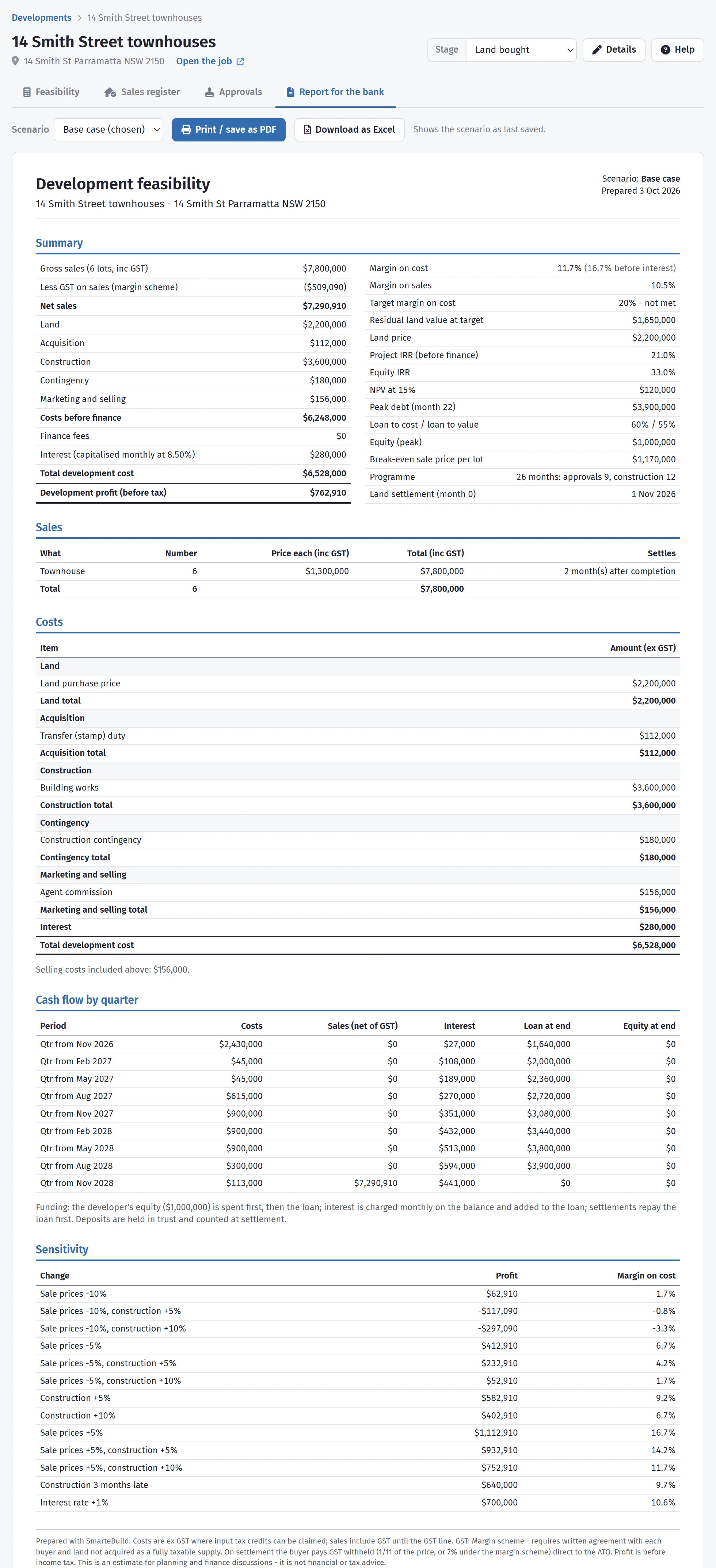
The bank, the valuer, your partner and your accountant all want the same job told a different way. The Reports tab prints each of them from the feasibility you already have — so the page you send the bank cannot disagree with the one you send the valuer. Each is dated, so “the feasibility you sent us” has an answer weeks later.
- Feasibility summary
- For the bank: cost, sales, profit, margin on cost, peak loan, loan to value and pre-sale cover, then the schedules behind them.
- Profit and loss, three ways
- By category, line by line, and the way a valuer sets it out — gross realisation down to development profit and risk.
- Cash flow and GST
- Money in and out by month, quarter or year, with the loan; and the GST on sales against the GST claimed back.
- Variations
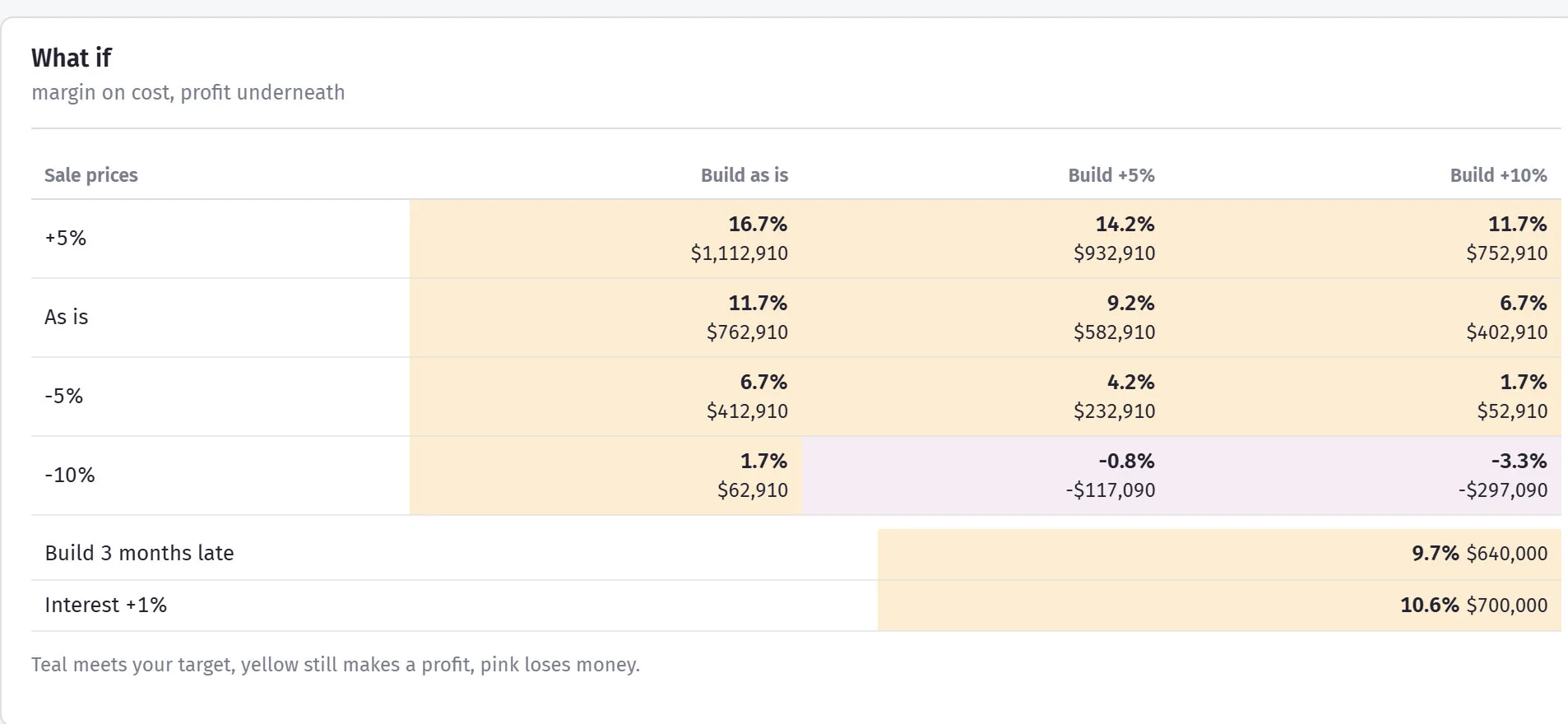
- One assumption moved at a time — land, build cost, build time, sale prices, selling time, interest — showing what each does to profit, margin and peak loan.
- Graphs
- Profit and loss, the variations, and the cumulative net debt with its peak marked.
Put the variations table in front of the lender before they ask. It shows you have already thought about what happens when costs rise or the market slows.
Once they start selling, the feasibility stops being a forecast
Every lot gets a line: type, beds, baths, cars, land and internal area, list price and sale price inc GST, buyer, agent, exchange date, deposit and whether it has been received, sunset date and settlement.
Each status — Available, Held, Exchanged, Settled, Keeping, Withdrawn — flows straight back into the feasibility, so the profit you are looking at is the real one, on the prices you actually got.
Deposits held in trust and sunset dates in the next ninety days are on the top row, because a sunset date you forget is a sale you lose.

The consents are the programme, and the programme is the interest bill
A feasibility that assumes nine months to a development consent and gets twelve has not lost three months. It has bought three more months of interest on the land, three more months of rates and land tax, and three months of selling in whatever market turns up instead of the one you priced.
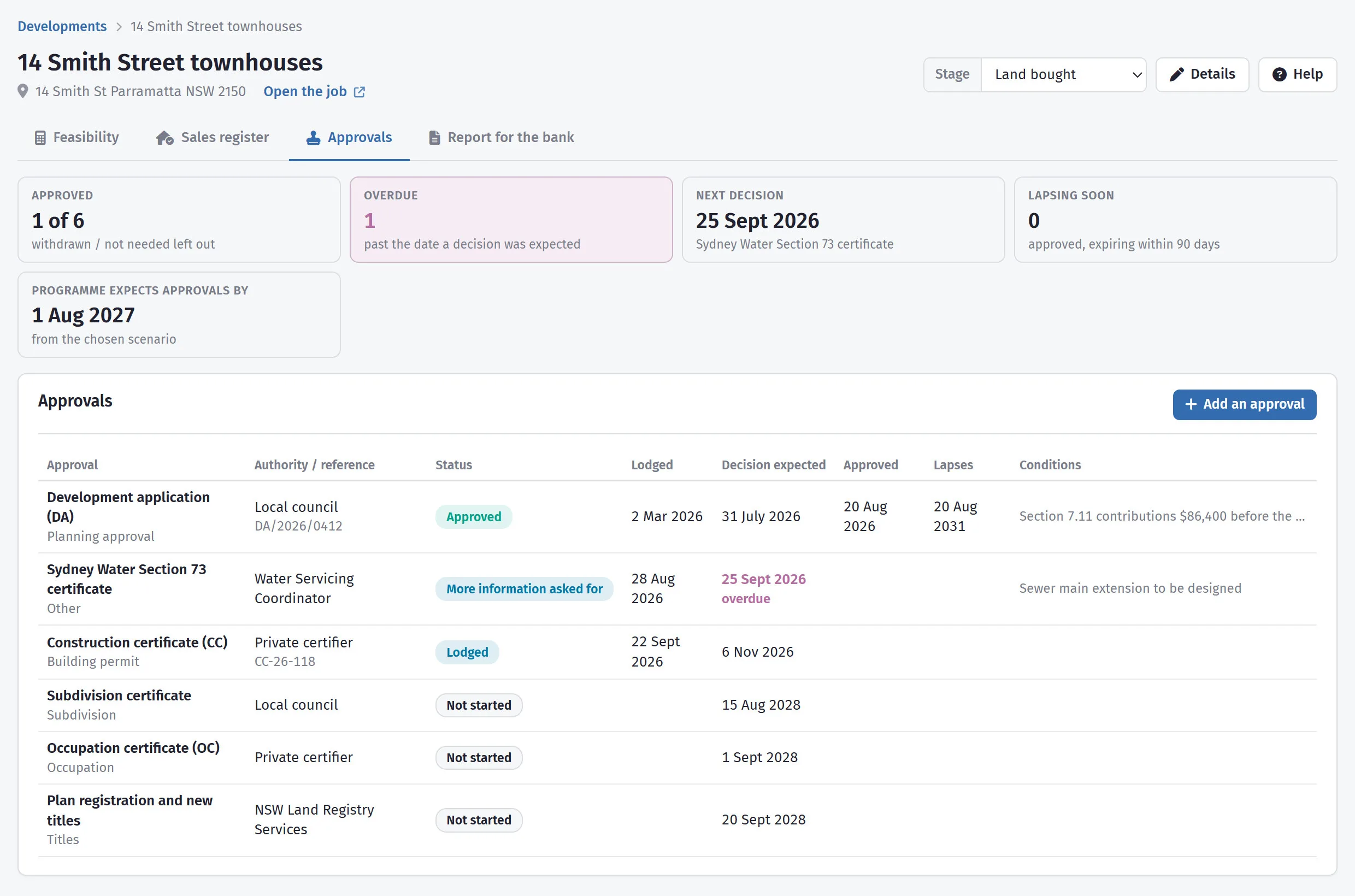
So every consent gets a line: the development application, the construction certificate, Section 73, the subdivision certificate, the occupation certificate and the registration of the new titles. Against each one — the authority, its reference, when it was lodged, when a decision is expected, when it was approved and when it lapses, with the conditions written out.
The top of the screen answers the four questions worth asking: how many are approved, how many are past the date a decision was expected, which decision is next, and which approvals lapse within ninety days. Beside them sits the date the chosen scenario's programme assumes you will be through them — so a slipping consent shows up against the feasibility, not just against a calendar.
And it tells you when you are not looking. A screen only helps the person who opens it. Overnight, SmarteBuild goes looking for the dates that are about to hurt — an approval past the date a decision was expected, a consent coming up on its lapse date at ninety, thirty and seven days, an exchanged lot nearing its sunset date at sixty, thirty and seven — and emails the people who can do something about them.
One email covers everything due, with a subject that says what is in it: “1 approval overdue, 1 consent lapsing, 1 sunset date coming up.” Each reminder is sent once, so you never get the same one twice, and a quiet week sends nothing at all. They go only to people who have the Development section and can open that job, which means a supervisor on one site is not emailed about another site's consents. Anyone can turn them off under Email on their profile.
Six stages, and where your money is sitting
A builder with three sites running has money tied up in all of them and a different question about each. The developments list puts them on one page with a stage against each, the feasibility profit beside the forecast profit today, spend against budget, and lots sold.
| Feasibility | Before you own anything |
|---|---|
| Land bought | Settled, holding costs running |
| Approvals | DA and construction certificate |
| Building | The estimate is now the budget |
| Selling | The sales register is driving the cash flow |
| Finished | Last settlement done |
Twenty seconds, end to end
Every site you have on one page, then one of them opened: the thirteen figures, the month-by-month cash flow, what the bank will lend against it, what happens if prices fall — and the feasibility as it prints for a lender.
On the Developer plan
Development is the one part of SmarteBuild that sits behind its own plan. It is not in the free trial and it is not in Enterprise — everything else in SmarteBuild is.
A closer look at Development
Across every site, under pressure, and on paper.

What it connects to
Nothing in SmarteBuild is an island — that is the point of it. Development reads from and feeds into these.
-
Bill of Quantities
The costed spine of the job — items, rates, markups and margin
-
Cash Flow
What the job costs you and when, projected across the programme
-
Projects & Estimates
Contract stages, markups and the numbers behind every job
-
Reports
Every module reports, and every report exports
Want the detail?
The help centre documents Development step by step, with worked examples — written for people using it, not for a brochure.
Start with one job and see
Try the whole thing free for 30 days. No credit card to start, and no lock-in contract.