
Every week a claim sits unraised is a week you are financing the client
You pay for the materials, the subcontractors and the wages before the client pays for any of it. Progress claims are how you get that money back during the job rather than at the end of it — and how quickly you raise them is a cash-flow decision, not an admin one.
Available on the Builder plan

Two ways to claim, and your contract decides which
Contract stages
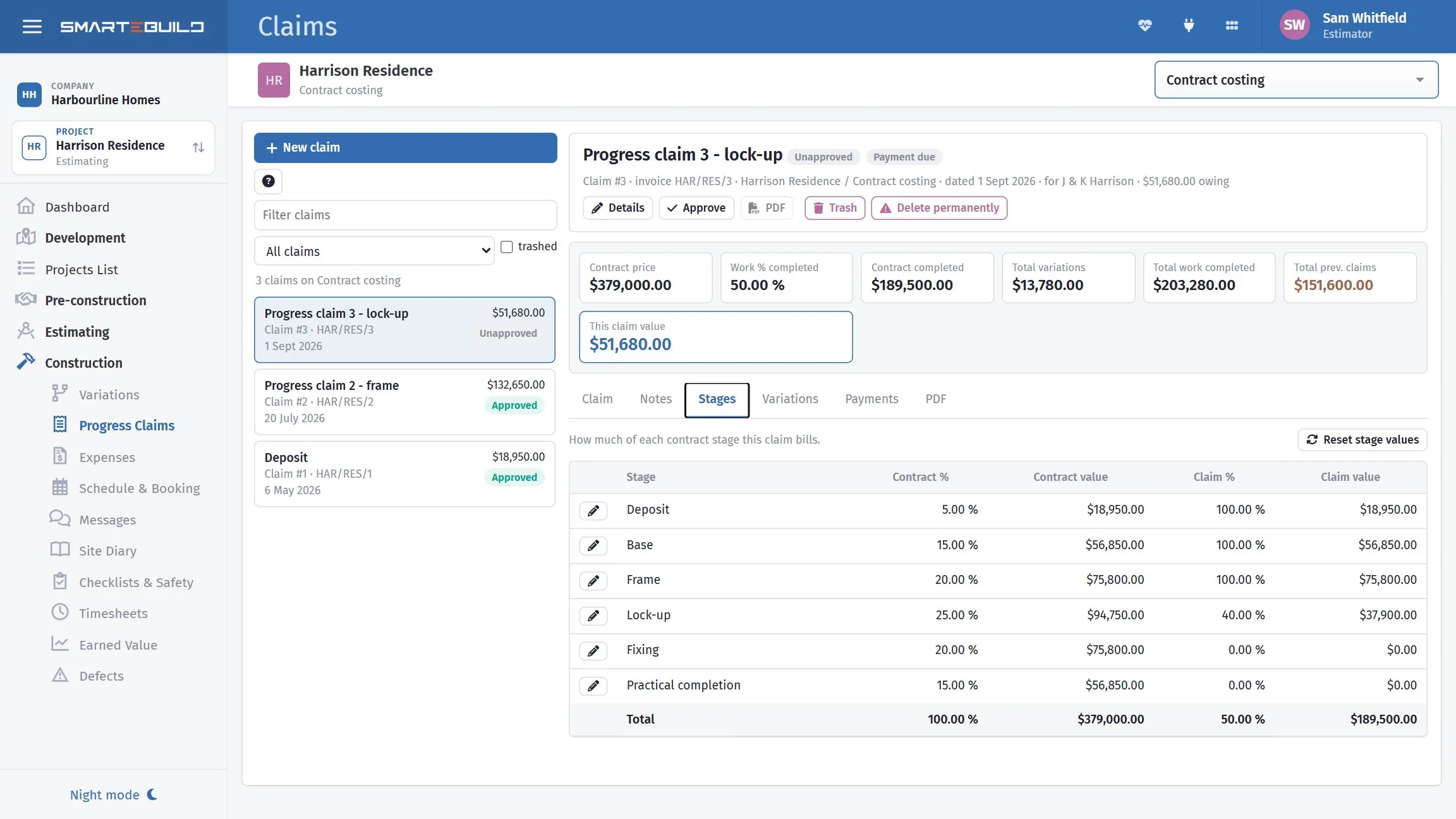
Deposit, base, frame, lock-up, fixing, completion. Each is a fixed percentage of the contract sum, and you claim a stage when you reach it.
How most domestic building contracts work
Percentage complete
You assess how far through the work you are and claim that share of the contract sum.
More common on commercial and cost-plus work
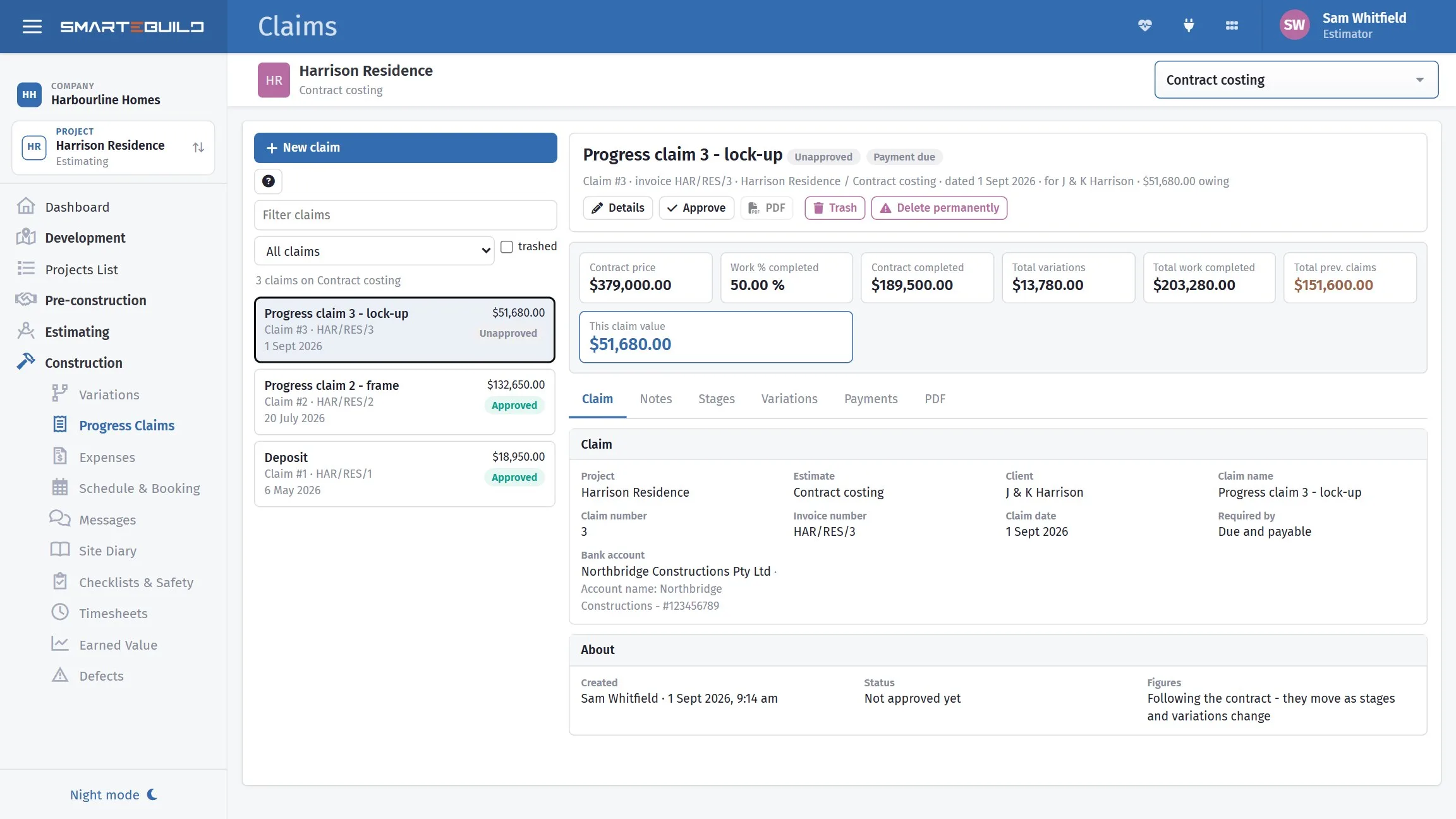
Either way the claim is a percentage of the contract sum — which is why the contract price and the stages have to be set on the project before claims produce a sensible number.
The life of a claim
-
1
Reach a stage
Or assess how far through the work you are.
-
2
Raise the claim
Against that stage, or against your assessed percentage.
-
3
Include variations
Approved variations change the contract sum, so they change what the stage is worth.
-
4
Issue it
To the client, with your invoice number and payment details, from inside SmarteBuild.
-
5
Record payment
Full or part payments recorded against the claim, so paid, part paid and outstanding are worked out rather than remembered.
Approved variations change what every remaining stage is worth
A variation that has been approved changes the contract sum. Because each stage is a percentage of that sum, an approved variation changes the value of every stage you have not yet claimed.
Unapproved variations cannot be claimed at all — which is the practical, cash-flow reason to chase approvals rather than letting them sit.
Raise it the day you reach the stage
Not at the end of the month, and not when you get around to the paperwork. Most domestic contracts give the client a set number of days to pay from the claim date.
A claim raised nine days late is paid nine days late, and you carried the money in between.
What a claim needs before it will work
A claim that will not produce a sensible number is almost always missing one of the first two. Worth checking before assuming something is broken.
| Needs | Where it comes from | If it is missing |
|---|---|---|
| Contract price | Project Info | Claim values come out as zero |
| Contract stages | Edit Stage on the project | Nothing to claim against |
| Client details | Project Info | The claim goes to the wrong place |
| Bank account | Set on the claim | The client cannot pay you |
| Approved variations | Variations module | You under-claim |
A closer look at claims
From the stage you reached to the money in the account.
What it connects to
Nothing in SmarteBuild is an island — that is the point of it. Progress Claims reads from and feeds into these.
-
Variations
Price a change, get it approved, and carry it into the contract
-
Projects & Estimates
Contract stages, markups and the numbers behind every job
-
Expenses & Invoices
Match invoices to orders and watch cost-to-date against budget
-
Cash Flow
What the job costs you and when, projected across the programme
Want the detail?
The help centre documents Progress Claims step by step, with worked examples — written for people using it, not for a brochure.
Start with one job and see
Try the whole thing free for 30 days. No credit card to start, and no lock-in contract.