
A superseded drawing on site is the most expensive document you own
Somebody builds from Rev B while the office has moved to Rev C, and the cost of that discovery is measured in demolition. Documents keeps one register per job, marks what is current, and puts it on the phone of the person standing in the building.
Available on the Estimator plan and above

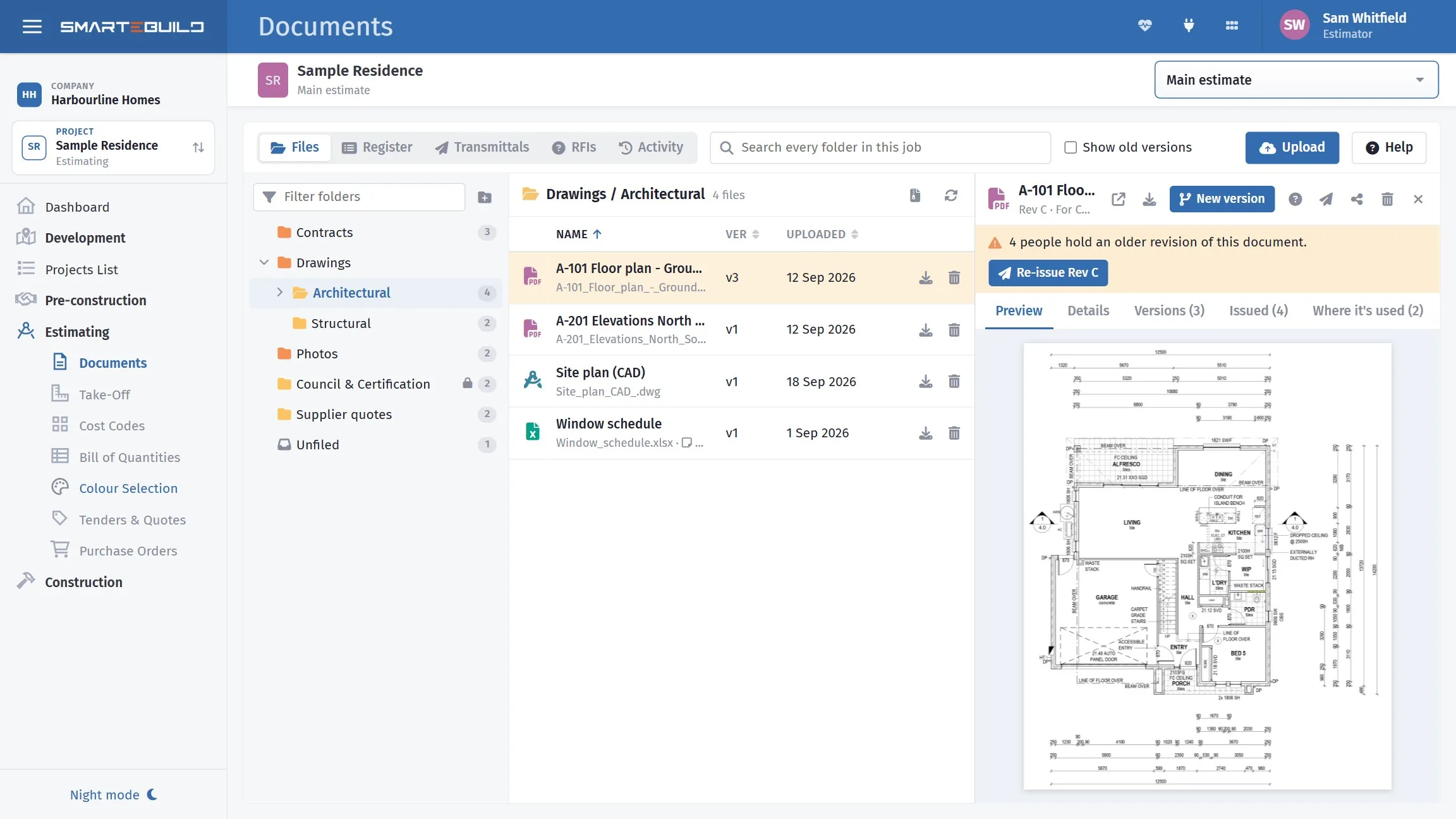
The document is the drawing. The revision is a version of it.
A-101 Floor Plan is the document. Rev A, Rev B and
Rev C are versions of it. Upload a new revision as a version of the
existing document, not as a new document, and the old one is superseded — still
there, still findable, no longer current.
It sounds like filing pedantry. It is what makes everything downstream work.
What depends on it
- Take-Off carry-over. Open a drawing you have measured when a newer revision exists and Take-Off offers to bring every measurement forward, flagged for review. That only works because it knows the two files are the same drawing.
- The mobile app shows what is current, so site staff cannot open a superseded set by accident.
- Tender packages go out with the right revision attached.
Four things against every drawing, and you type almost none of them
A drawing register is a list of every document on the job with its number (A-101), its revision (C), its status — preliminary, for information, for tender, for construction, as built — and its discipline. If two people can each have "the latest drawings" and they are not the same, you do not have a register.
The number and the revision are read from the file name when you upload.
A-101_RevC.pdf, S-201 Rev 2.pdf and A101 [C].pdf all
work, which is how most architects and engineers already name their files. Anything it
reads wrong, you fix in the register in place.
Filter it by discipline or status, print it for the head contract, or send it out to a spreadsheet. A last issued column shows the most recent transmittal each drawing went out on.

Emailing a PDF is not issuing a drawing
An email does not say what the drawing is for, it does not record which revision went to whom, and "I never got it" cannot be argued with. A transmittal can.
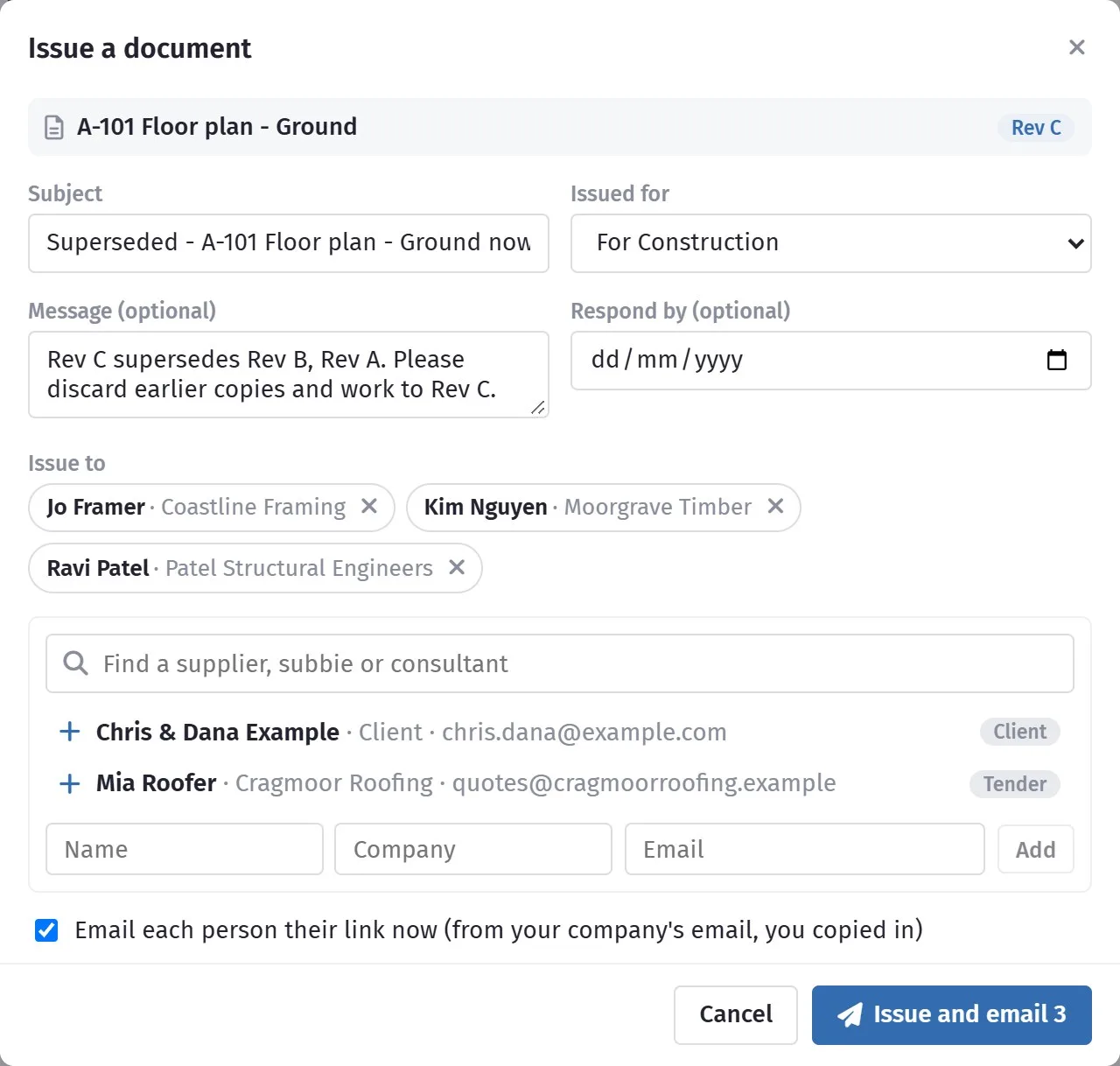
It is numbered — TR-001, TR-002 — and it records which drawings went, at which revision, to whom, when, and what they are issued for: information, construction, tender, review and comment, or approval. You can set a respond-by date.
Each person is emailed their own link, from your company's address, with nothing to log in to. You see when each of them opened it, and they press I have received these to acknowledge it. The people to send to are suggested from the job itself — whoever has been sent things before, the client, your tender invitees, the suppliers on its orders — or search every supplier contact you have.
A document that has been issued cannot be deleted. It is part of the record now.
The step that goes wrong, because it relies on somebody remembering
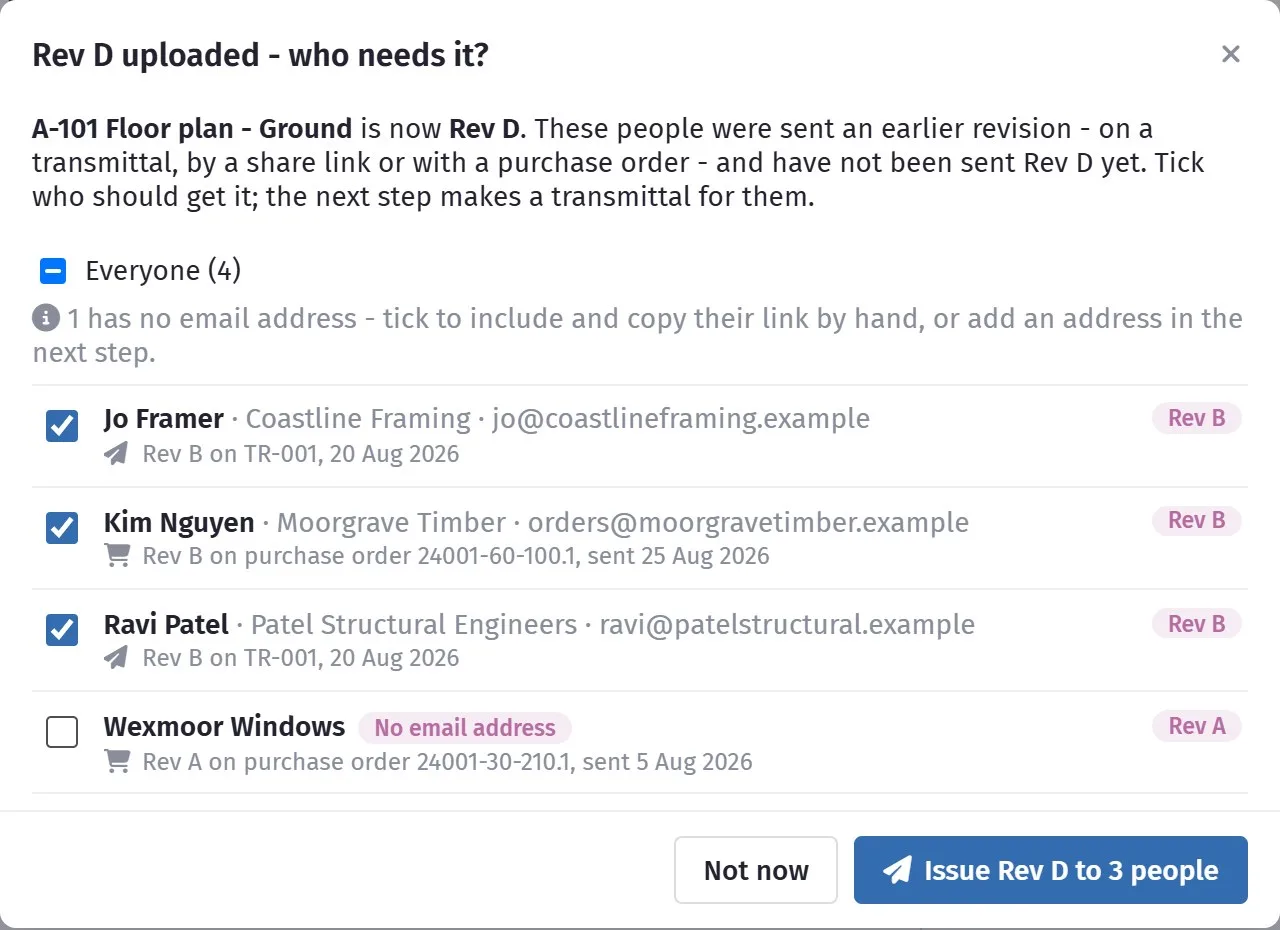
Rev C arrives, you file it, and three weeks later the window supplier delivers frames made to Rev B. Nobody told them. They had the old drawing because it was attached to their purchase order in August, which is not something anyone keeps in their head.
The moment you upload a new revision, SmarteBuild lists everyone holding an older copy — people on a transmittal, people sent a share link, and the supplier on every purchase order that went out with the old drawing attached. One row each, with what they hold and how they came to have it. Orders not yet sent move to the new revision on their own.
One button — Issue Rev C to 3 people — fills in the transmittal for you: the subject says superseded, the message asks them to discard earlier copies. Check it and send. Somebody with no email address on file is still listed, so you can include them and copy their link by hand rather than quietly miss them.
Until everyone has the current revision, the drawing carries a warning saying how many people do not.
One number in a window schedule, without leaving the job
Word and Excel files open in the preview as pages, the same way a PDF does — every sheet of a workbook, not just the first. Before, anything that was not a PDF or a photo gave you a Download button and nothing else.
Open a spreadsheet and there is an Edit button. It opens a full editor — cells, formulas, formatting, several sheets — so a window schedule or a quantity sheet can have one figure changed on the page.
Saving never changes the file you opened. Your edit becomes the next version, exactly as if you had uploaded it with New version: the original stays under Versions, orders not yet sent move to the new one, anyone holding the old one is offered the new one, and the note you type about what changed goes on the version. Nothing can be lost, because nothing is overwritten.
Charts, pictures, pivot tables, macros, comments, shapes and links to other workbooks cannot be kept in an edited copy. The editor lists them before you start, and if the file has any of them it tells you to download it, edit it in Excel and upload it with New version instead. Word documents preview but cannot be edited here, and a file over 25 MB, or a sheet with more than about 300,000 cells, opens in Excel only. An older .xls is saved back as .xlsx.
The consultant's programme, without MS Project on your machine
A programme arrives as an .mpp and nobody in the office owns MS Project, so it gets opened on somebody's laptop at home or not at all. Open it here instead: the tasks come up as a list with their outline, durations, start and finish dates, the links between them and the bars beside them.
Import into schedule brings it into the job's programme. It shows you what is in the file and what it would replace before it does anything, and it can be undone straight afterwards if it was not what you expected. The Schedule's own import takes .mpp and .mpx directly now — before, somebody had to open the file in MS Project and save it as XML first, which rather defeated the point.
Viewing only. The file is not edited or saved back, and nothing is exported to MS Project from here. The one thing that writes is bringing the programme into your own schedule.
Open the engineer's DWG without buying AutoCAD
Structural drawings arrive as DWG or DXF, and the office either has a CAD licence or it asks the engineer to send a PDF. Open the drawing here: scroll to zoom, drag to move, Fit to see it all, and turn layers on and off from a filter box so you can look at the footings without the services on top. There is a dark background if you prefer one, and the original is always there to download.
It is a conversion for viewing, and it says so on screen. Newer AutoCAD objects — tables, 3D solids — can be missing, text is drawn in one standard font rather than the drawing's own, and only the model shows, not the printed sheet layouts. Check the original before you rely on it. There is no measuring and no marking up here: that is what Take-Off is for.
The window head is 2100 on one drawing and 2400 on another
You ring the architect, they say 2400, and three weeks later nobody remembers who said it. An RFI is that question in writing — numbered RFI-001, with a date it should be answered by and a written answer against it.
Raise it from the drawing itself with the question-mark button and the drawing is attached for you. Give it a subject, a location and an answer-by date, and pick who to ask. They answer through their own link with no login, and can attach a marked-up sketch, which is filed in the job's RFIs folder. You are emailed the moment they answer. The list filters to what is waiting, overdue, answered or closed.
When it is settled you close it with the outcome: does it change the cost, does it change the time, and a note. That is the evidence behind a variation or an extension of time, written on the day rather than reconstructed six months later.

Let the engineer file their own drawings
Every revision that arrives by email has to be downloaded, renamed and filed, and somebody has to remember to do it. Make an upload link for one folder — Structural, say — and send it to the engineer. They drop files straight in without an account. Each one lands in that folder, recorded under their name, with its number and revision read from the file name like any other upload. The link stops on the date you choose, or the moment you cancel it.
Not everything is for everyone
The signed contract, the commercial correspondence and the variation negotiations belong with the people running the job. A company administrator can restrict a folder to chosen people — everybody else does not see the folder or anything in it, on the web or on the phone.
Administrators always see everything, and the standard folders every job gets cannot be restricted.
Stop emailing drawings, and stop guessing whether they opened it
A set of drawings is too big to email, so it goes to a file-sharing service nobody controls, with a link that works forever and no record of who used it. Documents sends the file from the job it belongs to instead.
To a subcontractor, supplier or consultant
Share makes a secure link — no login, nothing for them to join. Email it from inside SmarteBuild, or copy it wherever you like. You decide what the link can do:
- An expiry date, so a tender drawing stops working after the tender closes.
- View-only, if they should read it rather than keep it.
- How often it has been opened — the answer to "I never got it".
- Cancel it, in the same window, and it stops working straight away.
To the client
Open a file, press Share and tick show in the client portal. Everything in the job's Client Documents folder is shown there always, so the contract, the plans and the colour schedule sit where they can find them without being asked for.
They see what you ticked and nothing else. The rest of the register — your pricing drawings, supplier quotes, anything marked superseded — stays out of sight.
Filing that does not feel like filing
Drag files in from your computer, several at once, straight onto the folder they belong in. Drag a file onto another folder to move it, or a folder onto a folder to nest it. The search box reads every folder in the job at once — titles, file names and the note you wrote on it — because the folder something was filed under is the thing you are least likely to remember.
When you attach documents to an order, a tender or a variation, the picker is the same register with tick boxes. Tick it and it is attached; untick it and it is gone; ticks you made in another folder are still there when you come back. Anything you upload in that window is ticked for you.
When there is a dispute, the question is always who had what, and when
You want to answer that with a record rather than a memory. Every document has a History tab and every job has an Activity view. Between them they hold every upload, new version, view, download, change, share, issue, acknowledgement and RFI — with who did it and when.
People outside your company are marked as outside, so a supplier opening a transmittal or an engineer uploading through a link reads as exactly that. Filter by type, date or person, and send it out to a spreadsheet when somebody wants it in writing.

The nine habits behind all of this — and a worked example of a drawing going from Rev B to Rev C with three people holding the old one — are in Document control for builders, step by step.
Tidy documents are what make the app trustworthy on site
A job where drawings get emailed around instead of uploaded gives site staff nothing to look at — and the moment they stop trusting the register, they go back to a printed set that is two revisions old.
A closer look at documents
One register, versioned properly, reaching the places that need it.


What it connects to
Nothing in SmarteBuild is an island — that is the point of it. Documents & Drawings reads from and feeds into these.
-
Take-Off
Measure straight off the PDF and send quantities to the BOQ
-
Mobile & On Site
The job in your pocket, including where reception is poor
-
Tenders
Build a trade package, invite subbies, compare what comes back
-
Purchase Orders
Raise orders straight from the BOQ and send them without re-keying
Want the detail?
The help centre documents Documents & Drawings step by step, with worked examples — written for people using it, not for a brochure.
Start with one job and see
Try the whole thing free for 30 days. No credit card to start, and no lock-in contract.