
The structure decides what questions you can answer later
If concrete supply and concrete placing sit under one cost code, you can never separate them without going through the bill line by line. If they are separate, you get both numbers for free — on every job, forever.
Available on the Estimator plan and above
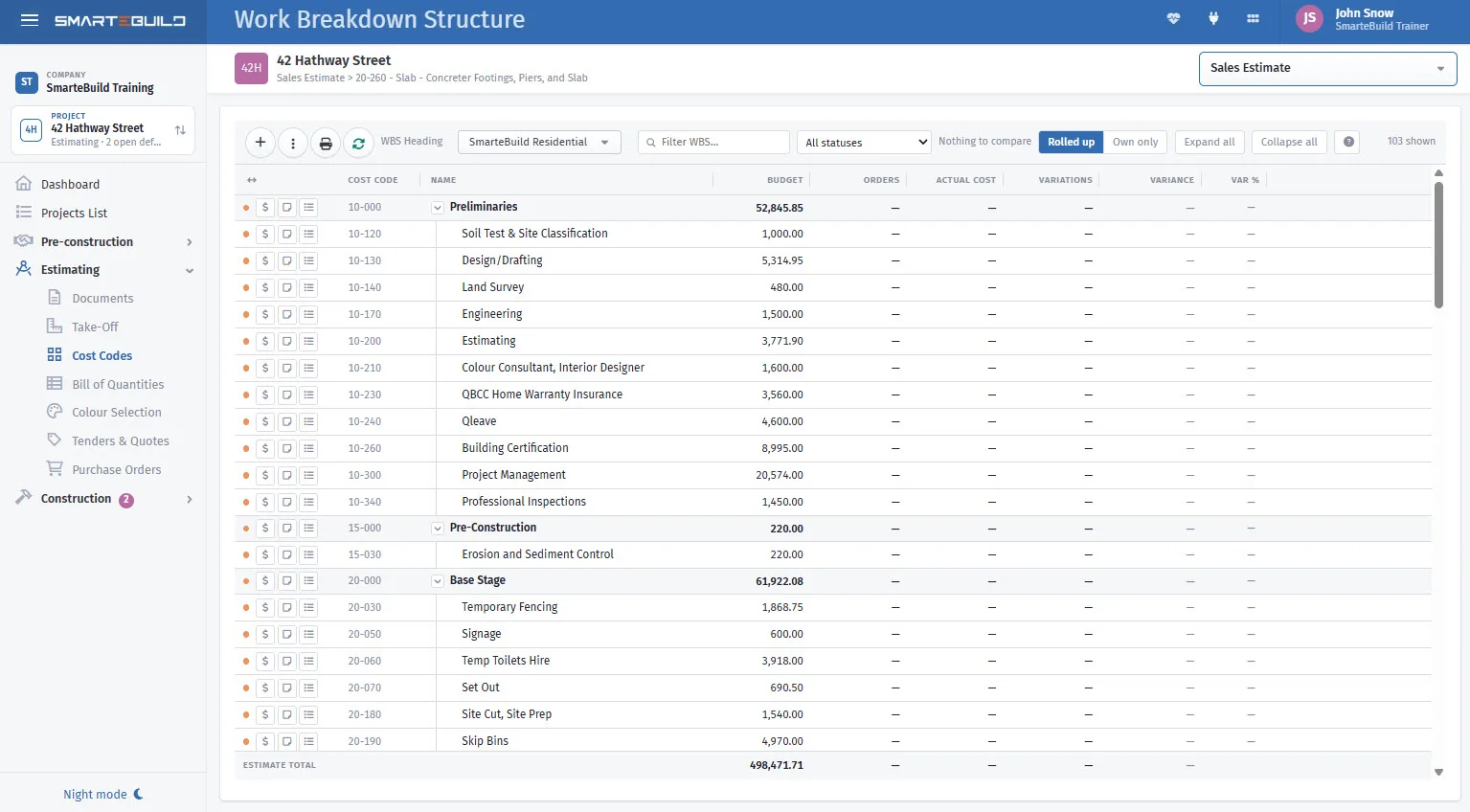
Four things read from it
Cost codes turn a long list of priced lines into something you can read a total off, compare between jobs and issue orders from.
- Purchase orders
- Grouped by cost code, so the structure decides how naturally an order maps onto one subcontractor’s scope.
- Cost reports
- Report by cost code. If two things share one, you can never separate them again without going line by line.
- Progress claims and expenses
- Both coded to them.
- Comparing jobs
- Only works if the jobs share a structure.
That last one is what people wish they had known earlier. Two jobs with different structures cannot be compared without manual work — so a structure you keep changing costs you your own history.
Most builders need one. Some need three.
A work breakdown structure is a named cost code tree. If none of the situations opposite apply to you, one structure is the right answer — and keeping several will only cost you the consistency that makes them worth having.
If your team keeps building estimates on the wrong structure, the fix is nearly always the Default WBS for new Estimates setting on the project, not more training.
| You do | You might want |
|---|---|
| New builds and renovations | A structure for each — renovations carry demolition and make-good that a new build has no line for |
| Residential and commercial | Separate structures; commercial usually needs more depth |
| Work for a builder who mandates their codes | Their structure alongside your own |
| Volume and custom homes | A tight volume structure, a fuller custom one |
Budget, committed, spent and variance — by trade, on one screen
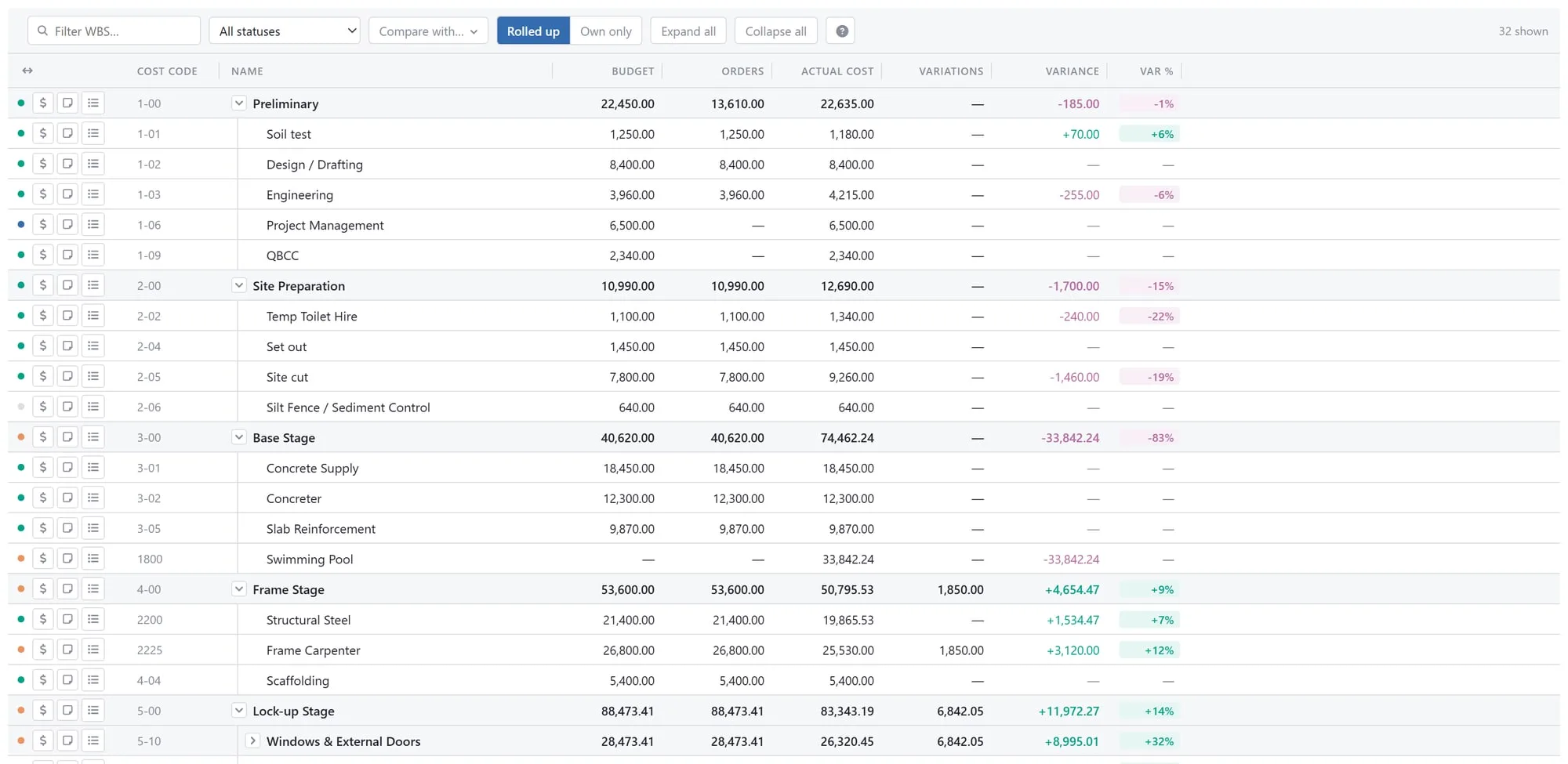
Once the work is coded, the cost codes stop being filing and become the report. Each code shows four figures, and a parent code rolls its children up:
| Budget | The estimate items under that code — quantity times rate — plus accepted variations. |
|---|---|
| Orders | Purchase orders committed against it. Money promised, before any invoice arrives. |
| Actual cost | Invoices coded to it, plus approved timesheet labour. |
| Variance | Budget plus variations, less actual cost — shown only once something has been spent, so an untouched trade does not read as a saving. |
A code can be marked Not required, which drops its budget to zero, Completed, or Waiting for quotation — so the list also tells you what is still unpriced.
Compare with puts up to four other estimates' budgets beside this one, a column each. It only offers jobs built on the same structure, because only then do the cost codes line up row for row — which is the whole argument for not changing the structure between jobs, in one screen.
Set it up once, reuse it forever
A structure built carefully on job one is still paying you back on job forty — because every one of those jobs is comparable with every other. That is the return, and it only arrives if you stop changing it.
A closer look at cost codes
The structure itself, where it is set, and what it gives you back.


What it connects to
Nothing in SmarteBuild is an island — that is the point of it. Cost Codes & WBS reads from and feeds into these.
-
Bill of Quantities
The costed spine of the job — items, rates, markups and margin
-
Projects & Estimates
Contract stages, markups and the numbers behind every job
-
Purchase Orders
Raise orders straight from the BOQ and send them without re-keying
-
Price Lists & Products
Your own rates, kept current, ready to drop into any estimate
Want the detail?
The help centre documents Cost Codes & WBS step by step, with worked examples — written for people using it, not for a brochure.
Start with one job and see
Try the whole thing free for 30 days. No credit card to start, and no lock-in contract.