
One job, as many priced versions as the job actually needs
A project holds the client, the contract price and the stages. An estimate is one priced version of it — and a job can carry as many as you need without them interfering with each other. That is what lets you price an alternative specification without losing the one you already sent.
Available on the Estimator plan and above

Where did the extra forty thousand go?
Pick any two estimates — the two revisions of this job, or this job against one you built last year — and put them next to each other. Left and right, or stacked, with the difference between them in its own column.
The Differences view throws away everything that matches and shows only what moved: what is in one and not the other, and every line where the money changed. Set a threshold and it hides anything smaller, so a forty-thousand-dollar gap stops being a hunt through nine hundred lines. What you are looking at downloads to a spreadsheet as it stands.
From the same screen you can copy lines across — the ones you pick, with a preview of what will land before it lands. That is how last year's job becomes the starting point for this one without retyping it, and how revision B of a tender keeps the three trades you got right in revision A.
Name them after what they are for
An estimate owns the bill of quantities, the take-off, the cost codes and the markups.
Tender — Rev A and Tender — Rev B (reduced spec) tell you which
is which in six months. Estimate 1 and Estimate 2 tell you
nothing.
Duplicate one to price an alternative, or save it as a template so the next job of the same type starts already structured rather than empty.
| Field | What it does |
|---|---|
| Name | How you tell this version from the others |
| Select your Price List | Which price list new items are built from |
| Copy items from a template | Start from a saved template instead of empty |
| Default WBS for new Estimates | Which cost code structure it uses |
| Make this estimate a template | Makes this estimate available to copy from later |

One line per job, and the two bars that matter
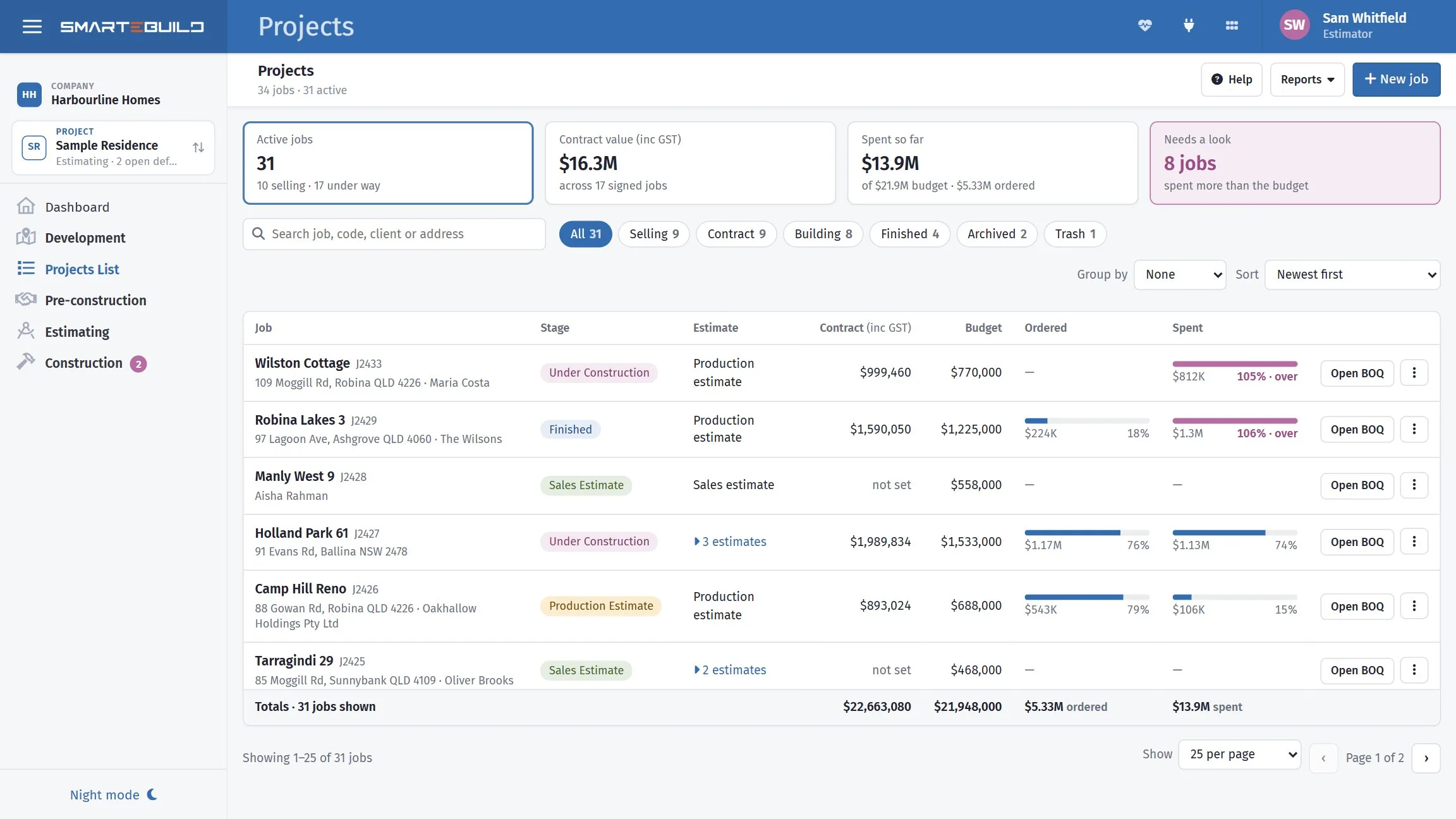
A builder with twenty live jobs does not want twenty-six rows because six of them carry two estimates. The list shows one line per job, built on its main estimate — the one furthest along — with the others a click away.
Each job shows its stage — selling, contract, building, finished — and two separate bars against the budget: what has been ordered, and what has been spent. They are deliberately not added together, because an invoice can turn up without an order ever being raised. A bar goes pink when it passes the budget, and Needs a look filters the list down to exactly those jobs.
Group by puts the jobs under your own groupings — region, build type, supervisor — each with its own subtotal. Search covers the job name, code, site address, client, grouping and estimate names. Export to Excel takes every estimate out with its figures, area and rates, which is the report most builders were rebuilding by hand every month.
The contract price and the stages are load-bearing
Progress claims are a percentage of the contract sum, and cash flow builds its income line from the stages. Set them on the project and both work. Leave them and both produce zeros — which is almost always the reason a claim will not calculate.
A closer look at projects
The list, the contract, and the numbers behind a job.


What it connects to
Nothing in SmarteBuild is an island — that is the point of it. Projects & Estimates reads from and feeds into these.
-
Bill of Quantities
The costed spine of the job — items, rates, markups and margin
-
Cost Codes & WBS
Structure a job once and reuse it on every job after it
-
Progress Claims
Claim by percentage or by stage, variations included, and track payment
-
Documents & Drawings
One register, proper revisions, formal issue and a record of who has what
Want the detail?
The help centre documents Projects & Estimates step by step, with worked examples — written for people using it, not for a brochure.
Start with one job and see
Try the whole thing free for 30 days. No credit card to start, and no lock-in contract.