
A lead with no next action is a lead nobody is going to ring
Leads is where a job lives before it is a project: the phone call, the website enquiry, the referral from last year's client. Each one is a person and a possible job, moved through a pipeline until it is either a project being quoted or a lost lead with a reason attached.
Available on the Estimator plan and above

Five columns, and the four figures that tell you how you are going
New leads this week, follow-ups overdue, how many are being quoted and for how much, and won against lost this month. Won and lost leave the board — switch to the list to see them.
-
New
It came in. Nobody has spoken to them yet
-
Contacted
You have made contact
-
Qualified
It is a real job, and it is worth pricing
-
Quoting
The project exists and the estimate is being built
-
Quoted
The number is with them
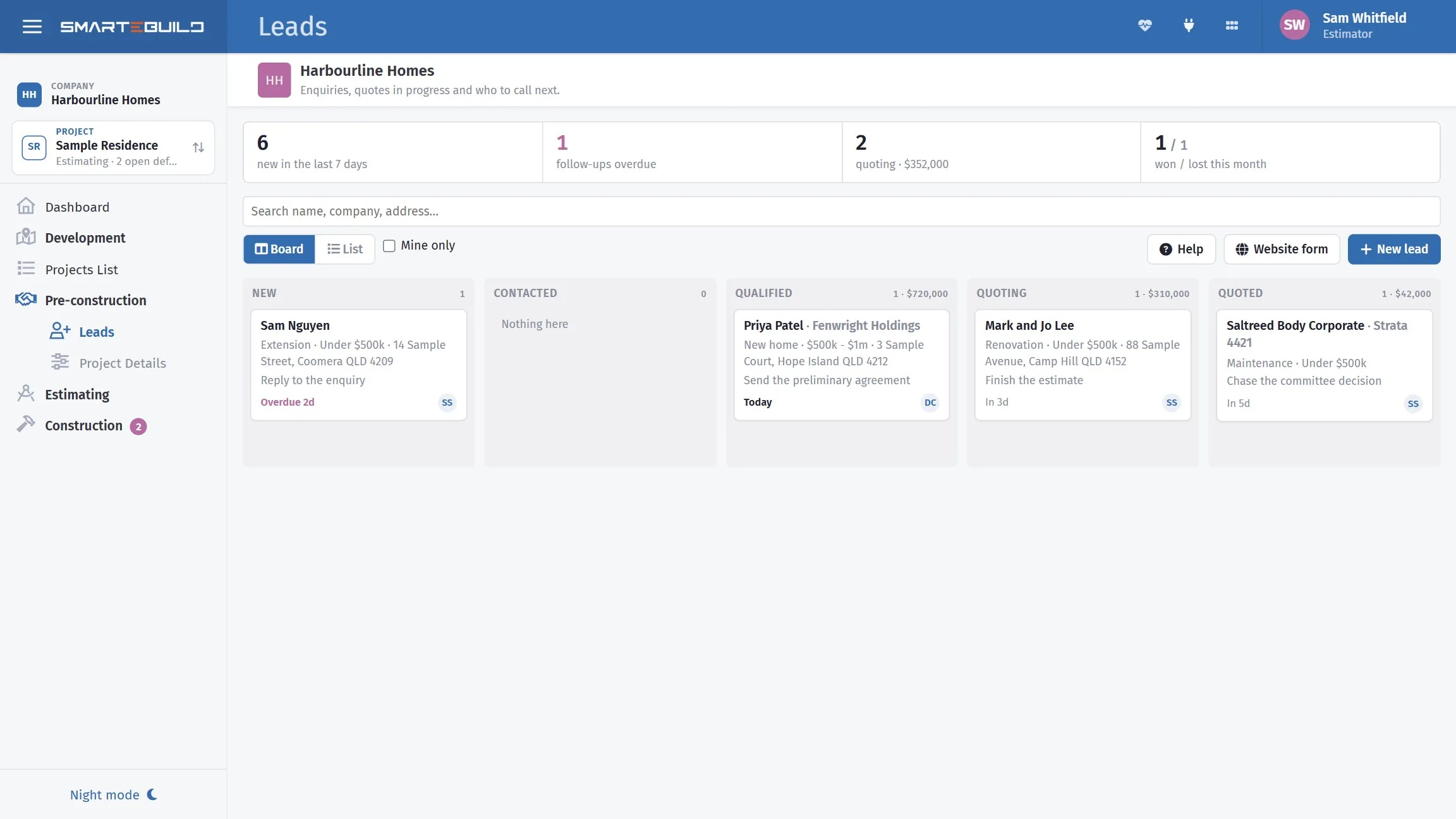
Set a next action every single time, even if it is "chase in a fortnight"
Open a lead and it is all on one page: the contact, the job in their words, the stage, and the timeline. Log a call, an email, a meeting, a site visit or a quote — write what happened, set the next action and its date, and move the stage in the same step.
The board's sort order and the overdue count are both built on that date. A lead without one drops quietly out of sight, which is exactly how enquiries get lost.
Why leads get lost
Almost never because nobody wanted the work. Nearly always because the enquiry sat in an inbox behind forty others, and by the time anyone rang, someone else had quoted.
Four or five registrations a week going unanswered is not a marketing problem. It is a follow-up problem, and it is the cheapest one to fix.
The enquiry becomes the project, without retyping any of it
One step creates three things, and the project remembers the lead it came from.
The project
With the lead's site address, in Quoting status.
The client
From the lead's name, email, phone and address.
A sales estimate
Copied from a template if you chose one, ready to price.
Won moves the project from Quoting to Contract. Lost asks for a reason and records it — and a year of those reasons is the most useful report this page produces.
The form on your site can create the lead itself
Point your existing contact form at the address SmarteBuild gives you and every enquiry arrives as a lead, with the customer's message as its first note, owned by whoever you nominate, with the next action already set to reply.
A hidden field catches bots. The endpoint never confirms whether a key is real, so nobody can probe for one, and it refuses anything with neither an email nor a phone — because there would be no way to reply to it.
For whoever built your site
It is a plain form post — or JSON, if they would rather use
fetch and show a thank-you without leaving the page.
POST https://app.smartebuild.com.au/api/leads/enquiry/{key}
SmarteBuild gives you the snippet with your key already in it. It does not send an acknowledgement to the customer — that is your website's job, and your first call beats any autoresponder.
A closer look at leads
One lead, the way you work it, and where they come from.


What it connects to
Nothing in SmarteBuild is an island — that is the point of it. Leads reads from and feeds into these.
-
Projects & Estimates
Contract stages, markups and the numbers behind every job
-
Tenders
Build a trade package, invite subbies, compare what comes back
-
Bill of Quantities
The costed spine of the job — items, rates, markups and margin
-
Dashboard
Every job on one screen, and what needs you today
Want the detail?
The help centre documents Leads step by step, with worked examples — written for people using it, not for a brochure.
Start with one job and see
Try the whole thing free for 30 days. No credit card to start, and no lock-in contract.