
AI for builders and estimators: what it really does
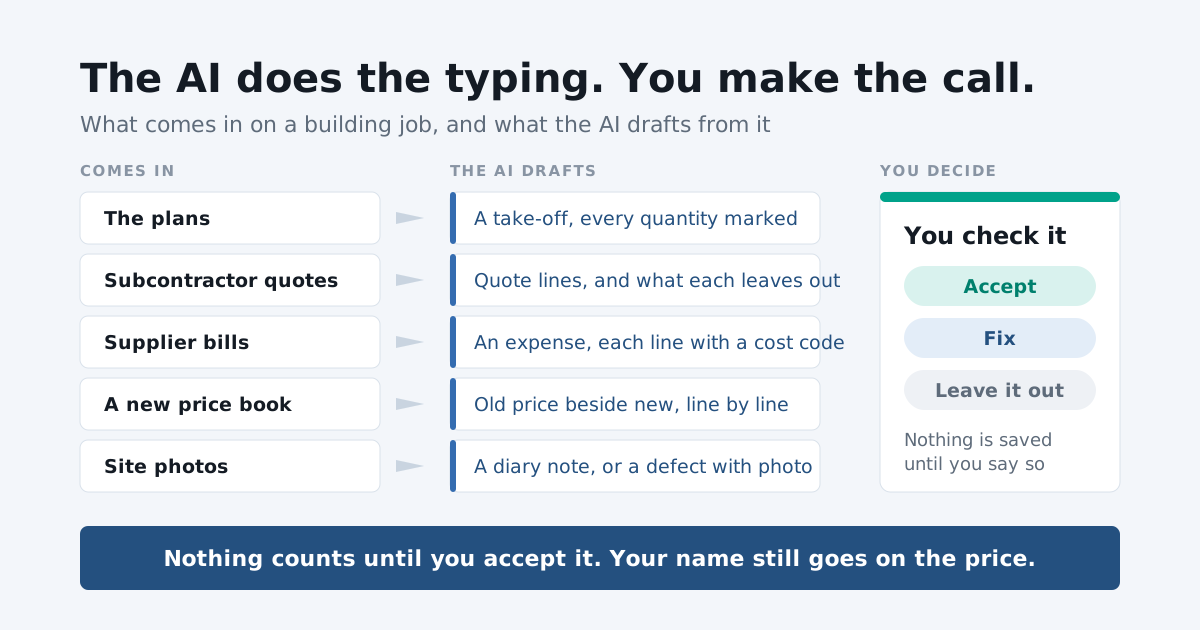
Ask a residential builder where the evenings go and the answer is rarely “building”. It is typing. Measuring plans into a spreadsheet. Keying a subbie’s four-page quote into a comparison. Copying a supplier’s bill into the accounts, line by line, and deciding which cost code each line belongs to. Writing up the day’s photos so the diary says something when the extension of time claim needs it.
None of that is the job. It is the paperwork around the job, and it is exactly the kind of work AI has become good at.
This article is about what that means in practice for an estimator or a builder running residential jobs: what AI can be trusted with, what it cannot, and how we have built it into SmarteBuild.
What AI is actually good at
Strip away the noise and today’s AI does three things well.
It reads. Plans, PDFs, scans, phone photos of a crumpled docket. It can find the quantity on a page, the total on an invoice, the exclusions buried on page three of a quote. Reading used to be the part only a person could do. It is not any more.
It drafts. Given what it has read, it can write a first version: a take-off, a list of quote lines, a programme, a diary note. Not a finished version. A first one, which is the part that takes longest to start.
It compares. Put three quotes side by side, or an estimate next to your last five jobs, and it can point at what is different, what is missing and what is there twice.
Notice what is not on that list: judgement. AI does not know that this client always changes the kitchen, that the block has a fall the plans understate, or that the cheap plumber has never once turned up on the day he said. You know that. The AI does not, and pretending otherwise is how people get burnt.
What it is not good at
Three limits are worth knowing before you trust anything an AI tells you.
It can be wrong and sound sure. An AI answer reads confidently whether it is right or not. A wall length misread off a dimension string looks exactly as tidy as a correct one. That is why every AI feature worth using shows you what it was unsure of, and why you check before you accept.
It has not been to site. It reads the documents you give it. If the plans are out of date, or the engineer’s detail never made it into the set, the AI’s draft will be faithfully wrong.
Your name still goes on the price. A quote you send, a claim you issue, a variation you sign: the liability is yours, not the software’s. AI shortens the path to the answer. It does not take the responsibility for it.
None of that is a reason to avoid AI. It is a reason to use it the right way round.
The right way round: draft, check, accept
The rule we built SmarteBuild’s AI around is simple. The AI drafts. You check. Nothing counts until you accept it.
That means three things in every feature:
- Nothing happens in the background. The AI runs when you press its button, on the document or the cost code you chose, and not before.
- Nothing is saved without you. A draft lands marked for review. You accept it, fix it, or leave it out.
- It says what it does not know. A quantity it is unsure of is marked as one to check. A question the job’s records cannot answer gets “I don’t know, look here”, not a guess.
Here is how that plays out across a job, from the first look at the plans to the final bill.
Estimating
A first draft of the whole take-off
Start an estimate from your template, open the plans and press Draft this take-off. The AI reads every page and answers each measurement the estimate needs: the quantity, the page it came from, and how sure it is, marked Sure, Check or Guess, least certain first. What it could not answer is listed as left for you to measure, with the reason.
Every line lands on the drawing marked for review, so you check it against the plans, then accept it or fix it. A whole-job draft takes about A$1.10 to A$2.60 of AI credit, and every company gets its first three free. How the take-off draft works.
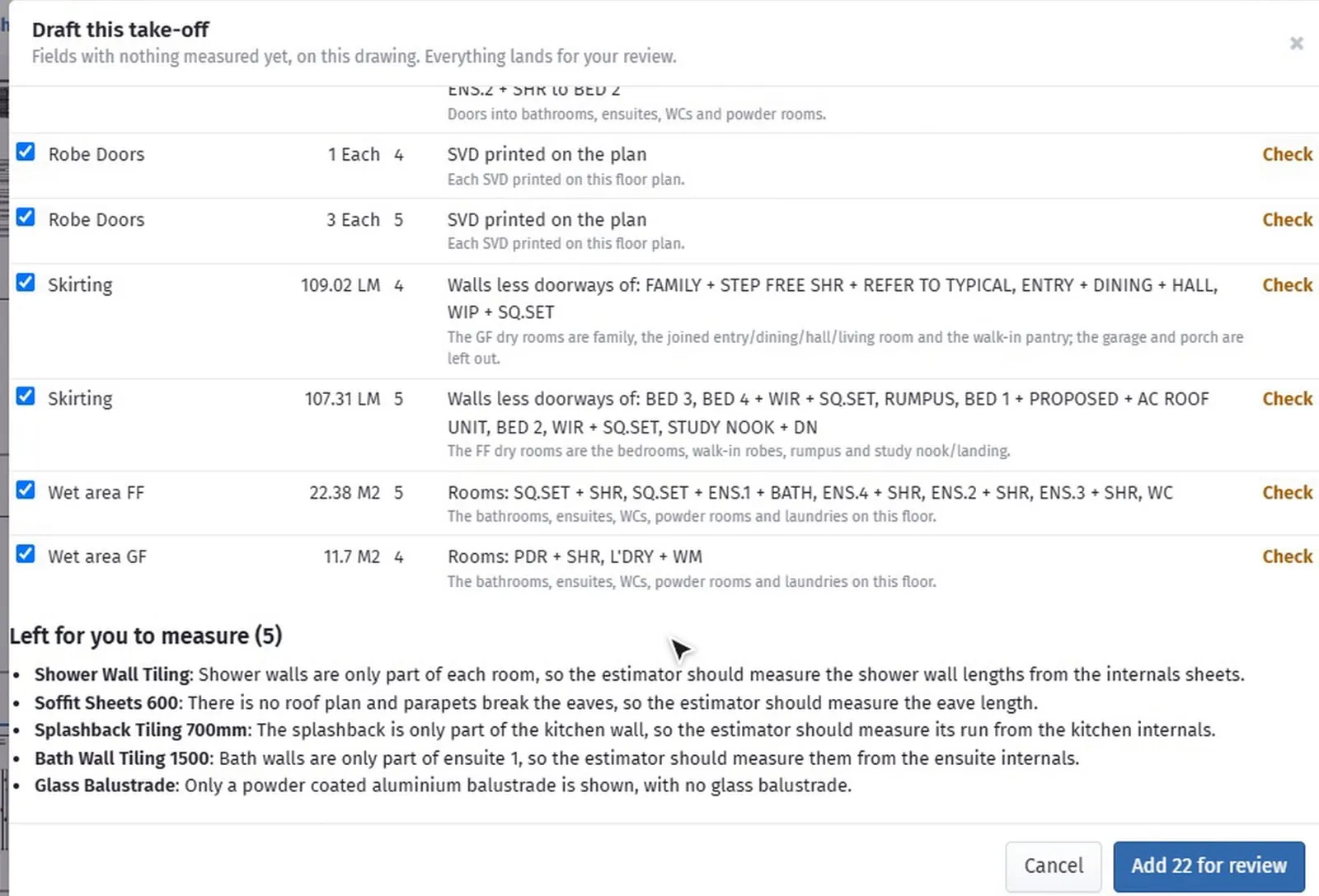
The honest way to think about it: the draft does the first two hours of measuring. You still do the last half hour, the half hour that needs a builder’s eye.
Ask about one cost code
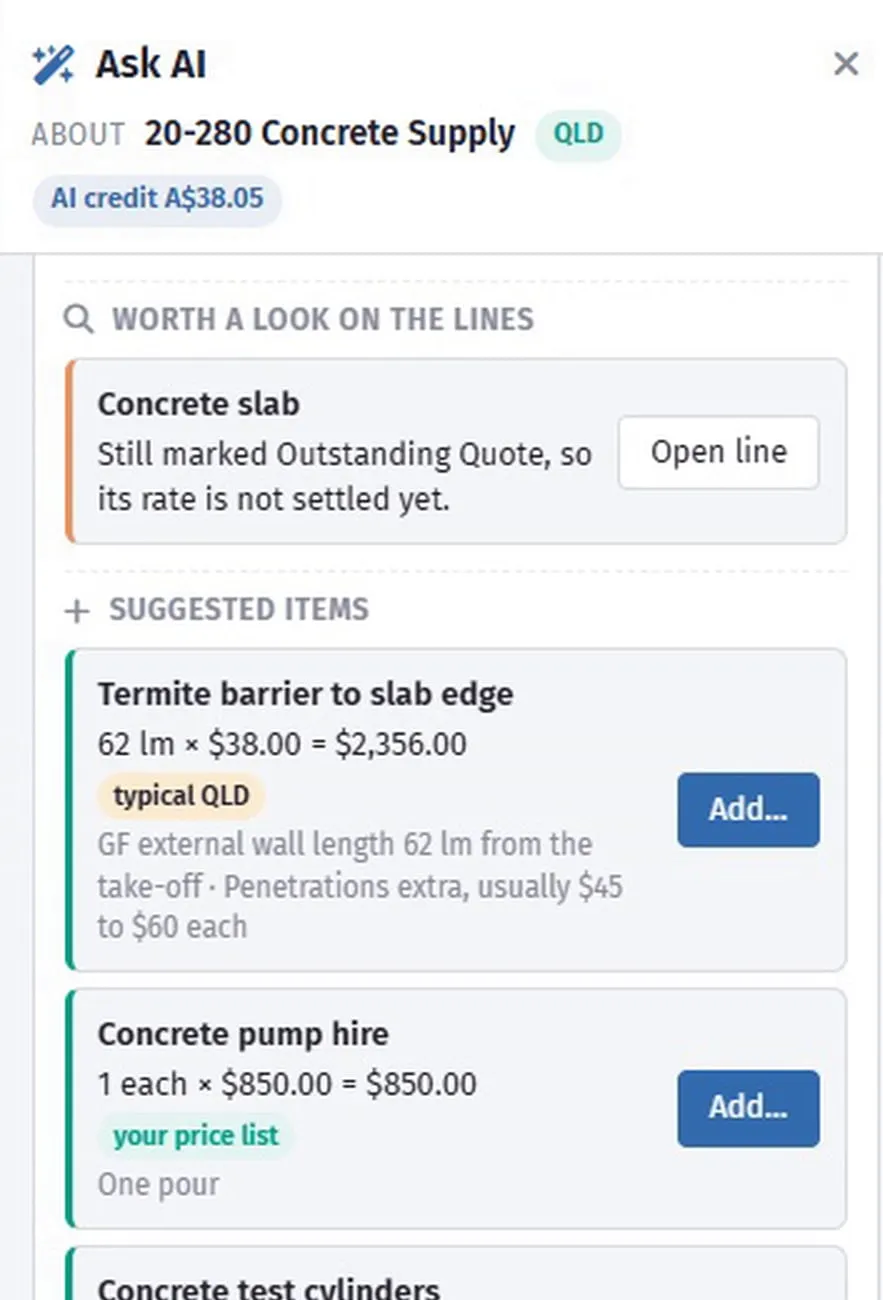
Halfway through an estimate, the question is usually narrow. Is my roofing complete? Does that framing rate look right? Ask AI in the bill of quantities is a conversation about the cost code you have open. It reads that cost code’s lines, the job’s measurements and your own price list, and tells you what usually goes in it on a job like this, what is missing, and whether the rates look right.
It suggests items. It never adds them. A suggestion opens the ordinary item window, filled in, and nothing goes into the estimate until you check it and save. Ask AI about a cost code.
A second pair of eyes before the price goes out
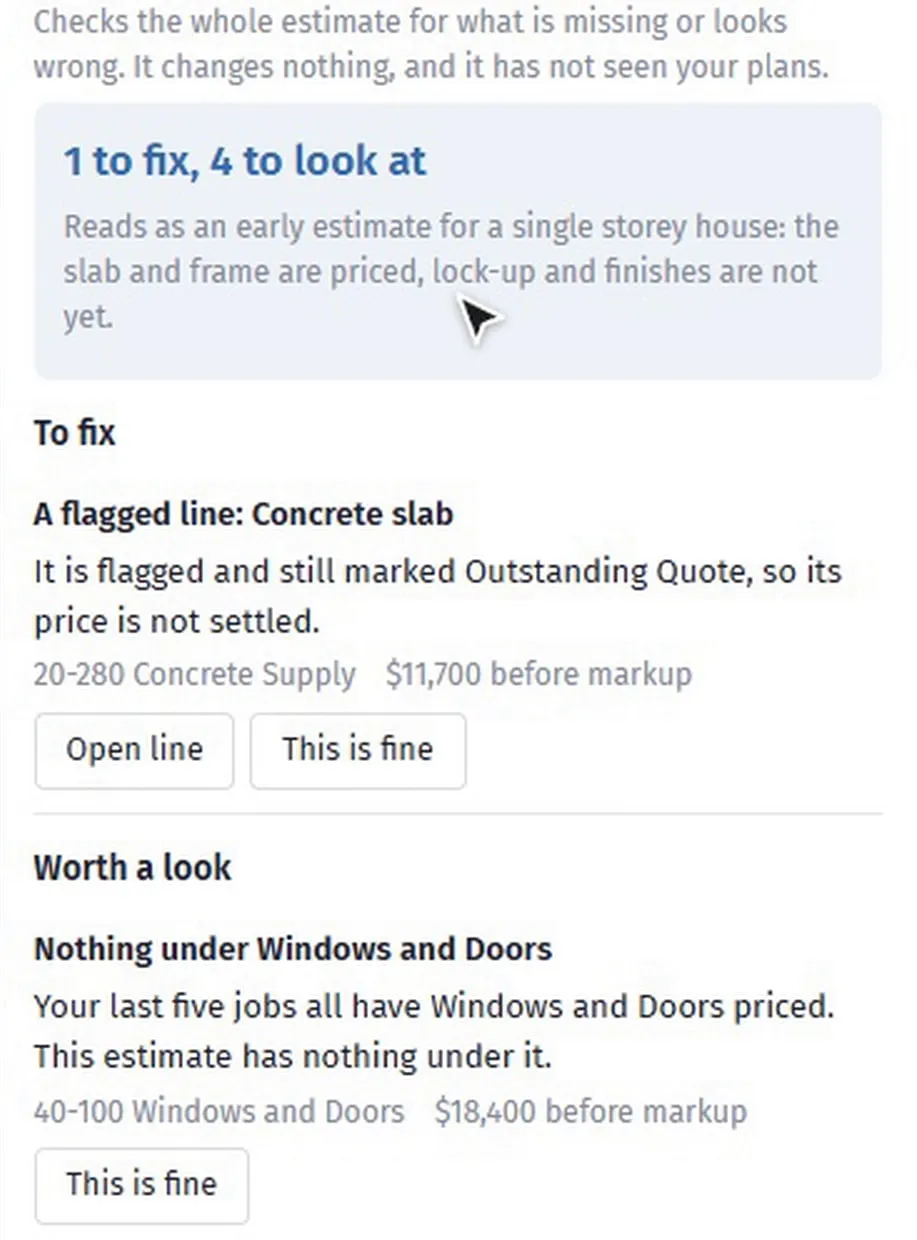
Every builder has sent a price with a hole in it. Final check looks over the whole estimate before it leaves and lists what is missing or looks wrong, biggest money first: lines with no price, out-of-date quantities, a line in twice, no markup, and how this job compares with your own past jobs. That part is free on every plan.
Read with AI goes further. In about a minute it looks for work the house needs that nothing pays for, the same work under two names, and quantities that do not fit the house. It is sent the lines and measurements, never the client’s name or the address, and a read costs about 50 cents. It has not seen your plans, so “nothing found” does not mean nothing is wrong. How Final check works.
Tendering and quotes
The quote came back as a PDF
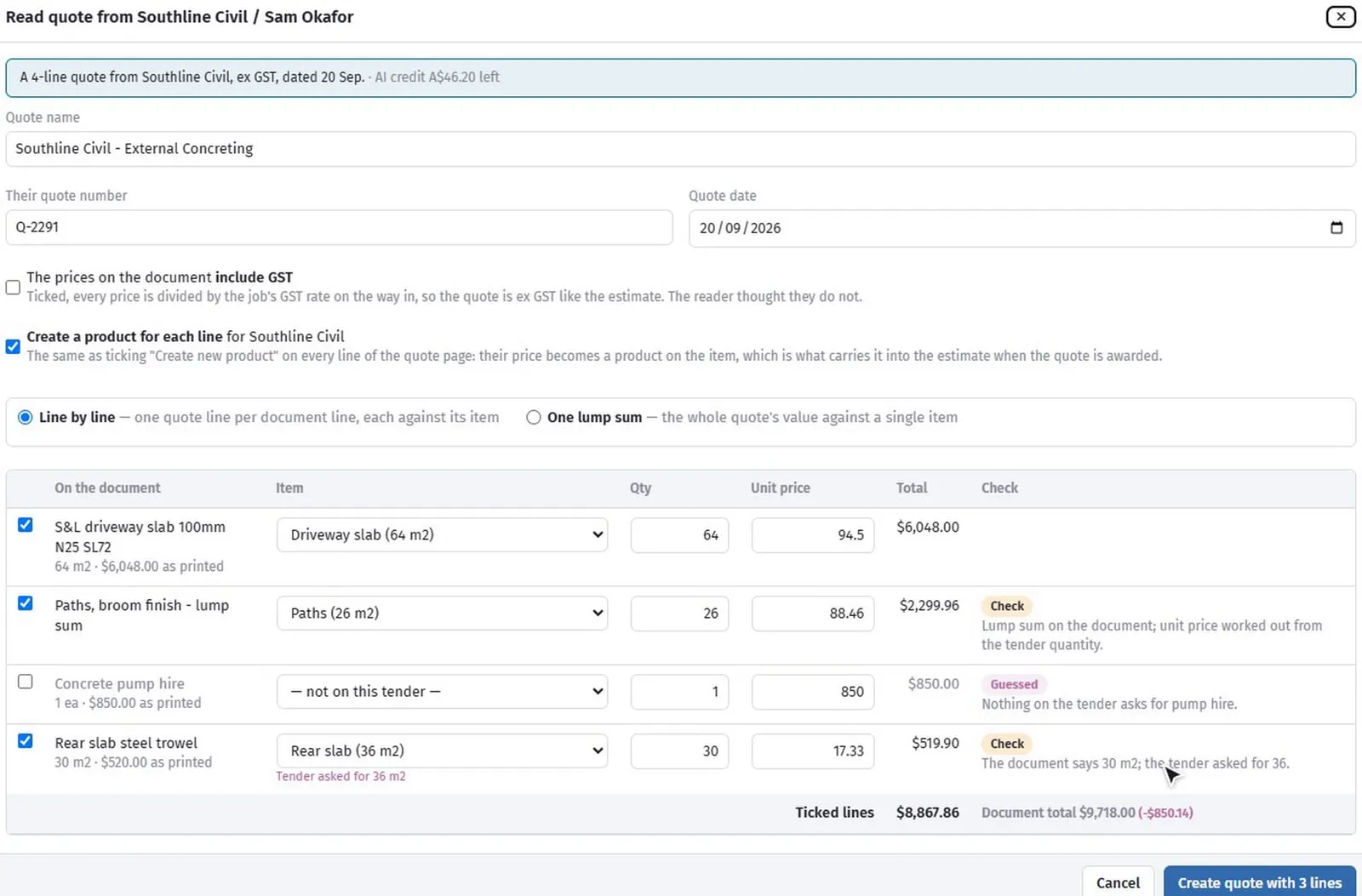
Subbie quotes arrive as PDFs and photos, in every layout imaginable. Press Read quote on the subcontractor’s row, drop in the document, and in under a minute its lines are matched to the tender’s items with quantities and prices, with the lines it was unsure of marked. For a long supply quote, such as a four-page steel schedule, Section totals only gives one line per section instead.
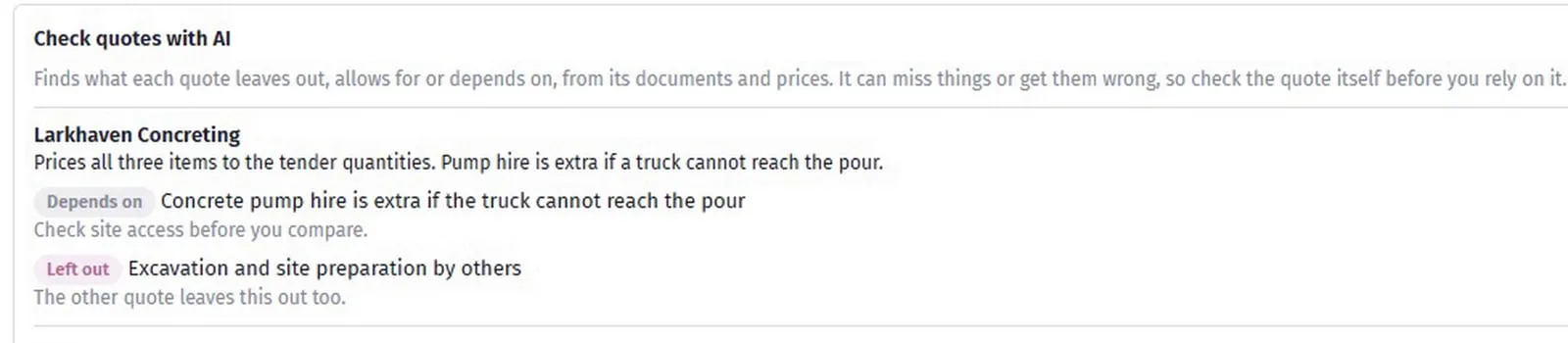
Then Check quotes with AI, on the Compare tab, reads every quote and lists what each one has left out, made an allowance for, depends on, or added that you did not ask for. That is the fine print that turns the cheapest quote into the most expensive one. It can miss things, so read the quote before you rely on it. Reading and comparing quotes.
Nobody on your list in that area
A job in a new suburb and no plumber you know within an hour. Find local businesses shows your own suppliers in that trade first, then businesses nearby with their distance, Google rating and whether an active ABN was found. Adding one brings the name and ABN from the Australian Business Register. Licences and insurance are not checked for you, so check those before you engage anyone. A search is about 35 cents. Find local businesses.
The programme
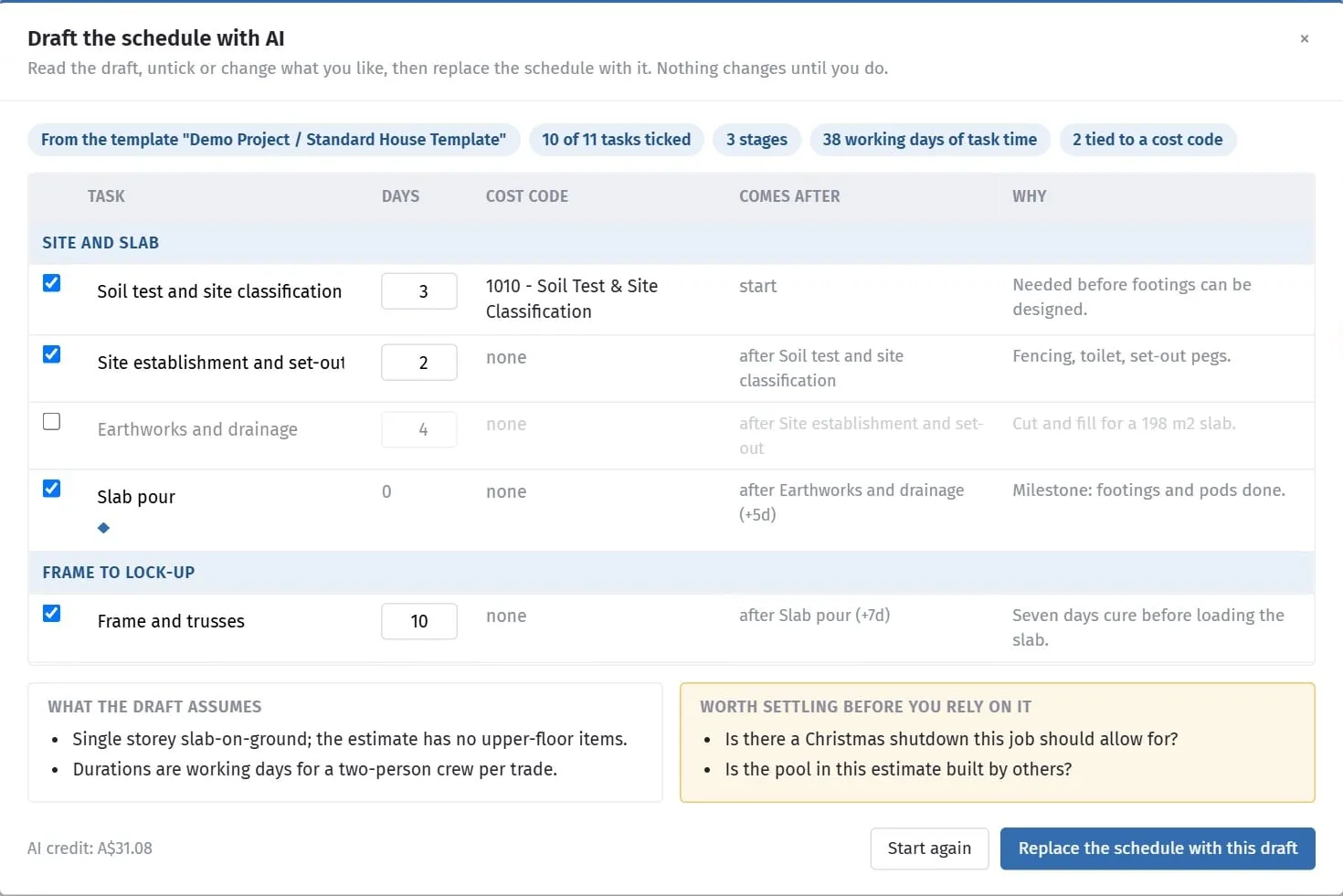
A blank Gantt chart is where good intentions go to die. Draft with AI on the schedule reads the estimate’s cost codes, with your template as the starting point if you pick one, and proposes the stages, tasks, durations and links for this job, with a reason for each. You change anything in the table, then put it in the schedule. It also lists what it assumed and what to settle before you rely on it. Draft the programme.
If the links in a programme are new to you, FS, SS, FF and SF explained covers what they mean on a residential job.
Running the job
Supplier bills
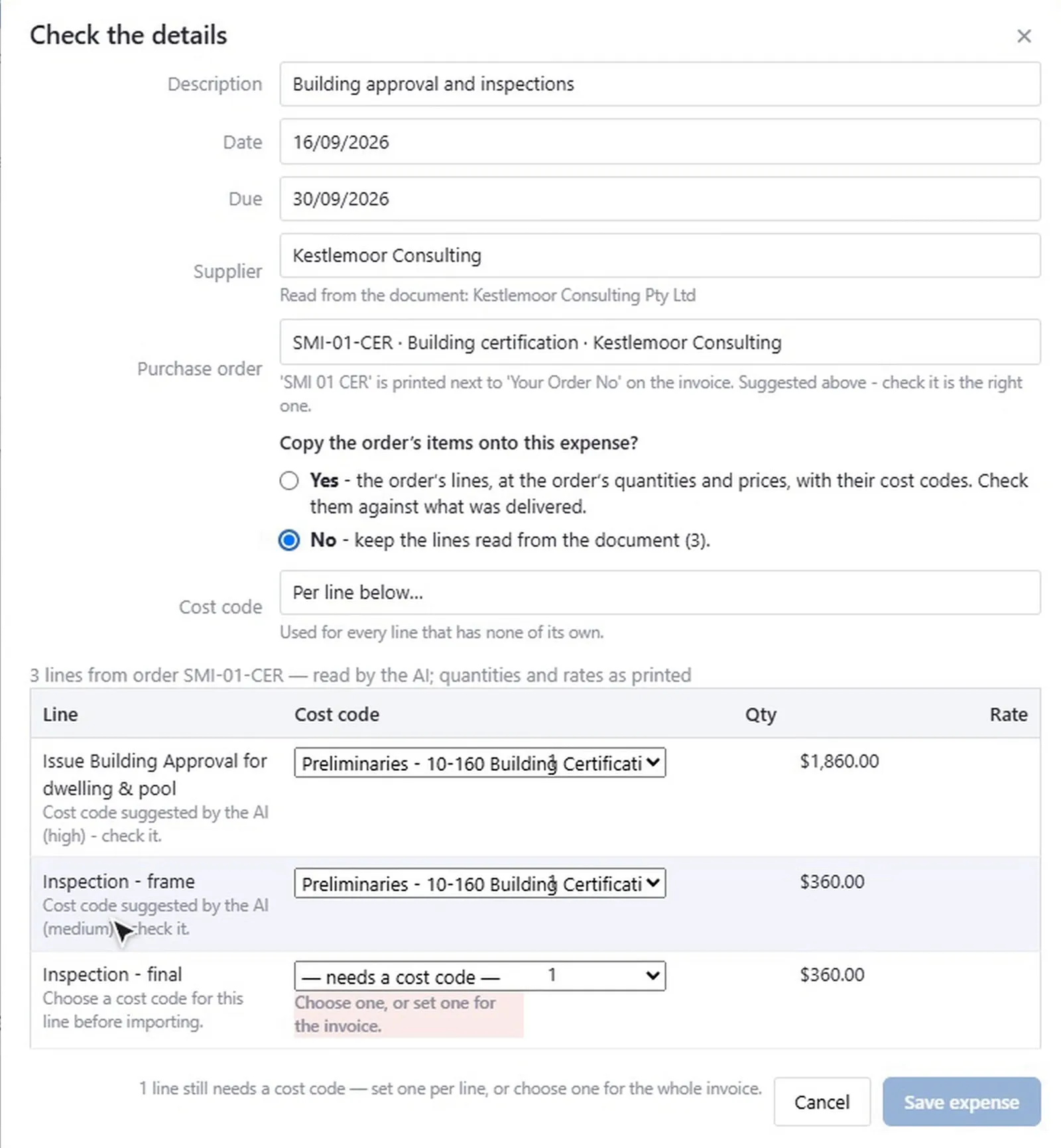
The free reader already picks the invoice number, date, total and order number off a PDF. Read with AI does the rest, from a scan or a phone photo as well: the supplier, reference, dates, total, the purchase order it quotes, and every charged line with a suggested cost code. You confirm or correct each figure, and nothing is recorded against the job until you say so. That is the right way round for the one document that decides what a job cost. Expenses.
A new price book
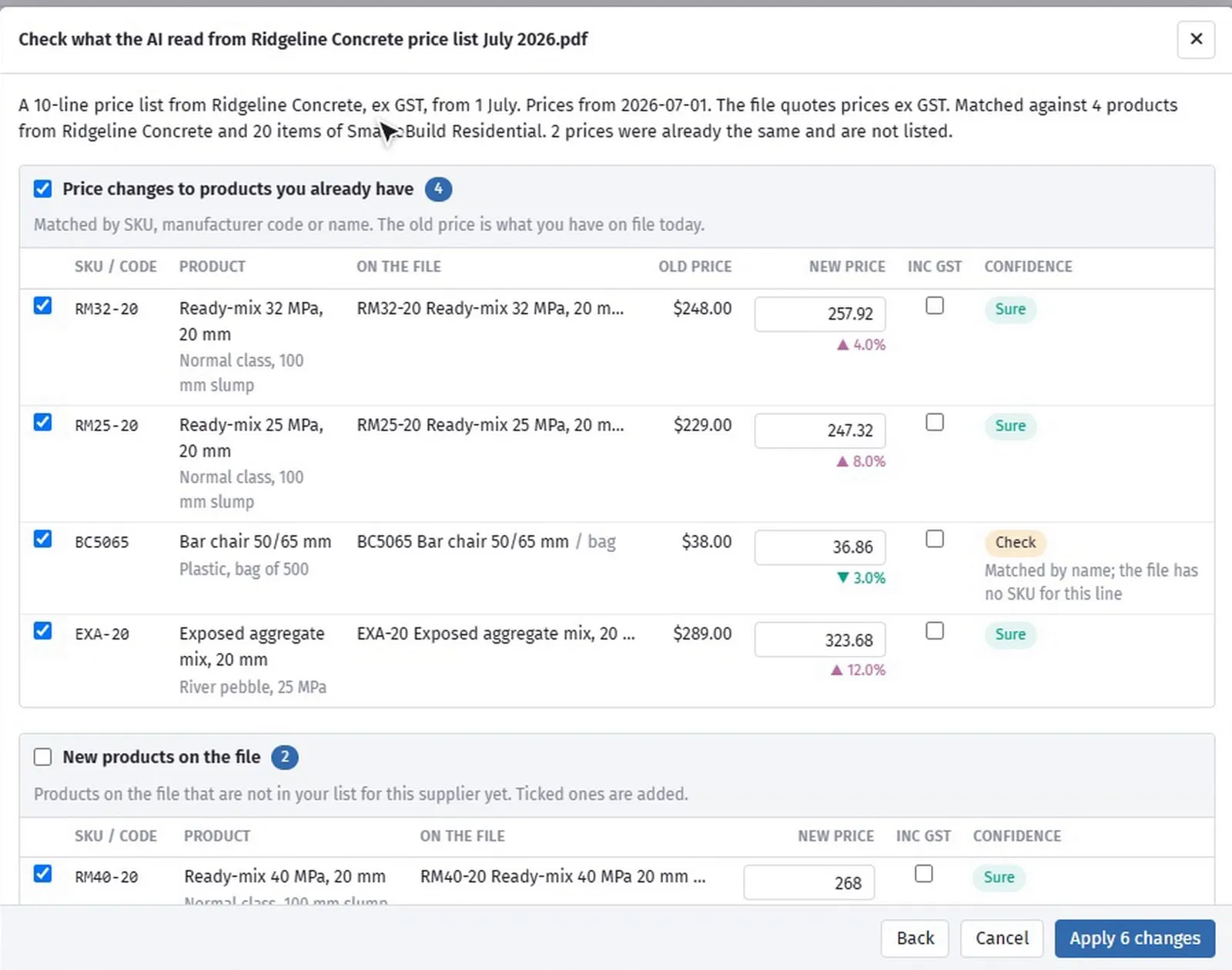
When a supplier sends a new price list, Update from supplier file reads it, PDF, photo, Excel or CSV, and shows the changes to products you already have, old price beside new, plus the new products and the lines it could not place. Tick what to keep and press Apply. Nothing changes until you do, and every change goes into the price history like a price you typed. Price lists.
Ask the job
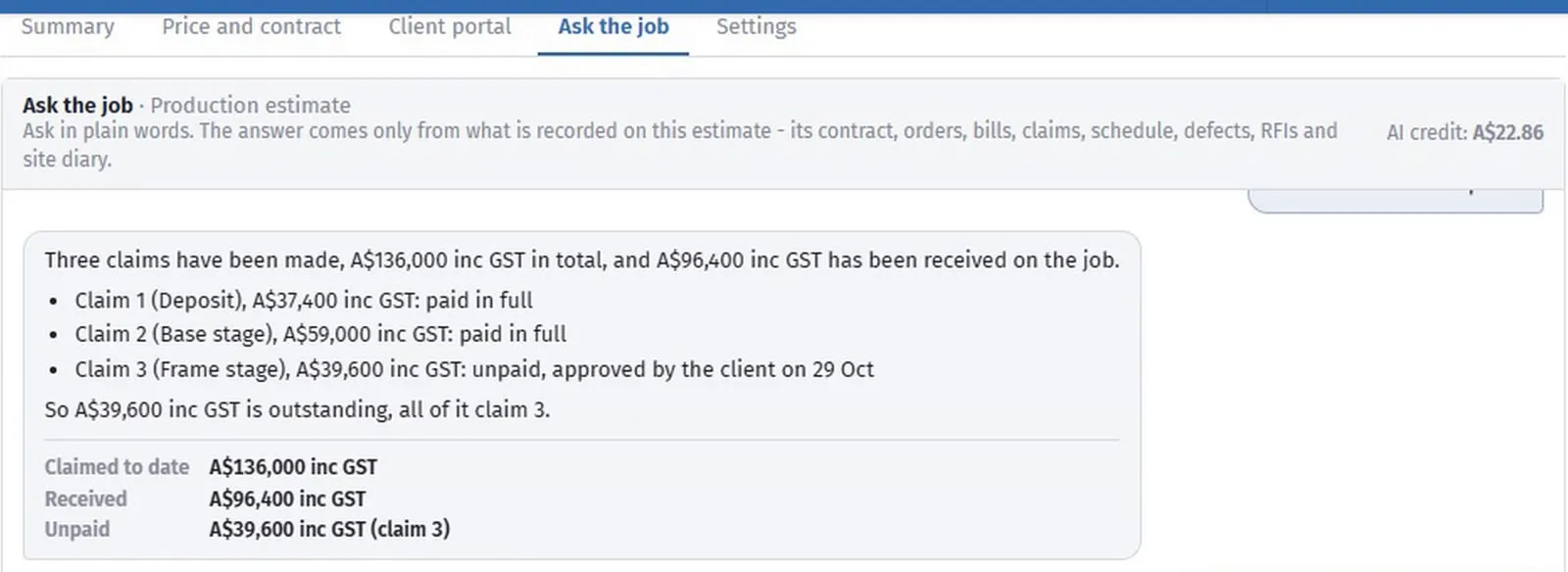
What do we owe this month? Which claims are unpaid? Which cost codes are over budget? Ask the job answers questions like these from the job’s own recorded figures, and says whether each money figure includes GST. If the job does not hold the answer, it says so and names the page to look at. Treat it as a quick read and check the figure before you act on it. Ask the job.
Site photos
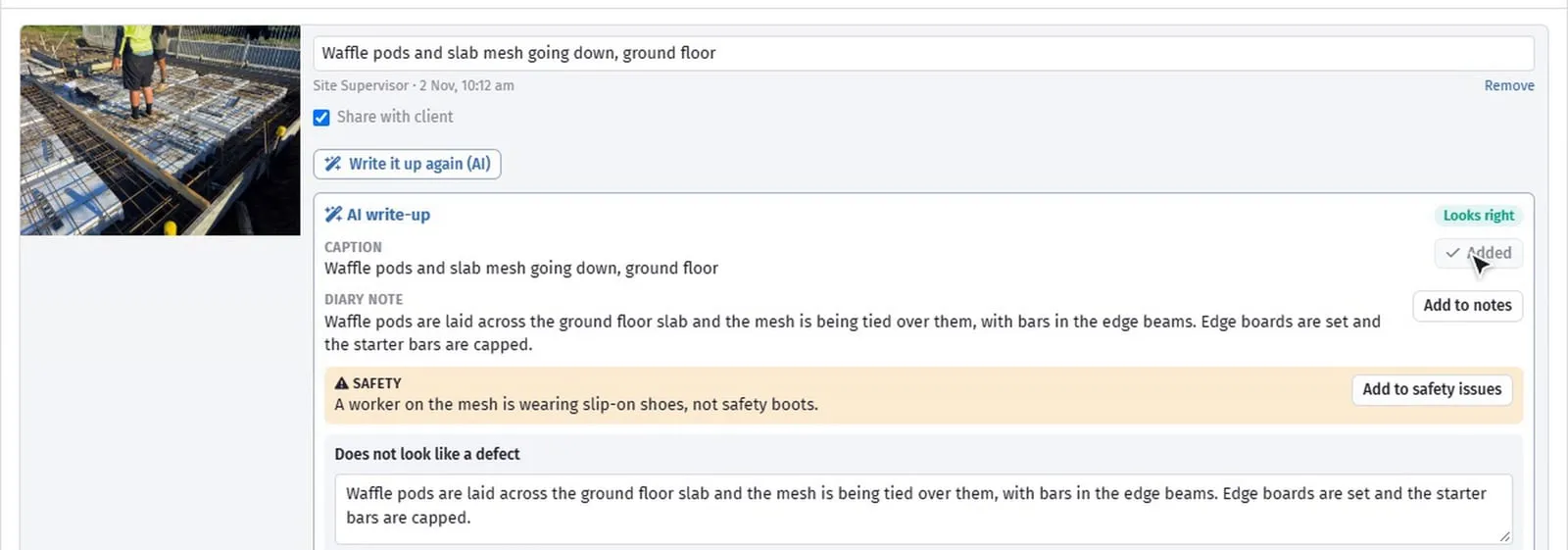
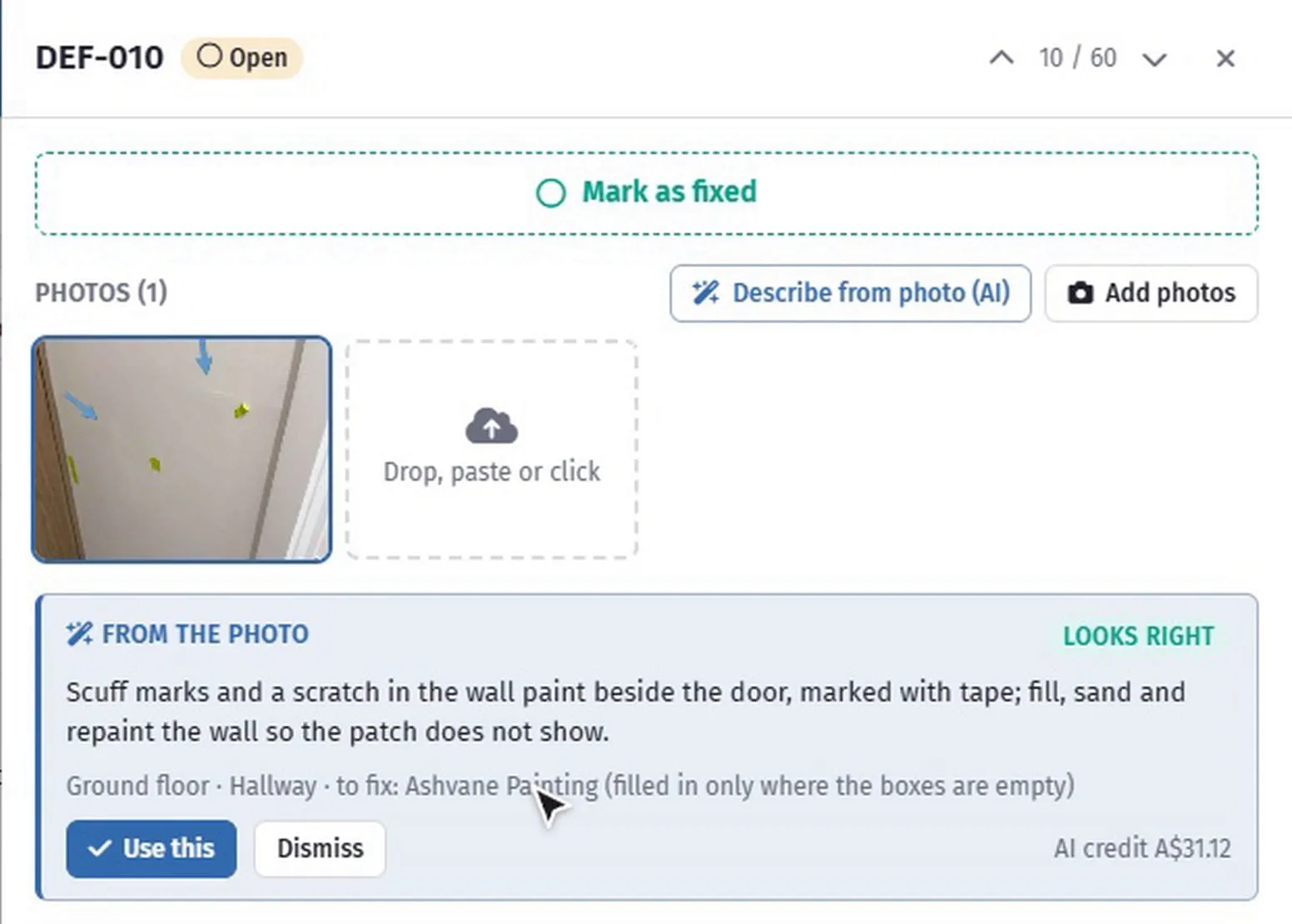
On a diary photo, Write it up drafts a caption, a diary note, and a safety or programme issue if the photo shows one. If it looks like a defect, Raise as defect puts it on the defect list with the photo attached, and Describe from photo on a defect suggests the observation, location, room and trade from the job’s own lists. A diary written on the day is worth far more in a dispute than one reconstructed on Friday. Site diary · Defects.
On site, on the phone
The SmarteBuild phone app, on Google Play and the App Store, carries four of these out to the slab. Walk through with voice reads a checklist aloud, item by item, and the AI turns a spoken “fail, the lintel over the laundry window is missing” into a Fail with its note. Read the docket matches a photo of the delivery docket to its purchase order and marks what came short while the truck is still there. A spoken toolbox talk is written up with its hazards and must-dos, and Ask the job is on the phone too. As everywhere else, you confirm before anything is saved. The phone app.
What it costs
The AI features run on prepaid AI credit: A$55 a pack including GST, bought once by card, and nothing renews by itself. The AI credits page in SmarteBuild lists every AI job and what it cost. Every new account starts with three whole-job take-off drafts free, and A$10 of AI credit with its first subscription payment. Unused credit expires 12 months after credit was last added.
Everything else in SmarteBuild works without it. AI is there for the jobs where it saves you time, not a toll on the rest of the product. Pricing.
Where to start
Do not try all of it at once. Pick the one job that eats the most of your week and try AI on that.
- If you estimate: run Final check on your next estimate before it goes out. The free part alone will find something.
- If your evenings go on quotes: read the next subbie quote with AI and compare it with typing it in.
- If the accounts are always behind: photograph the next supplier bill and let the AI code it.
Then keep doing the part only you can do: deciding.
You can watch each of these working, two or three minutes each, on the video tutorials page.
SmarteBuild is Australian, AI-assisted estimating and construction management software for residential builders. Try it free for 30 days, no credit card, every module to try.