
Construction scheduling: FS, SS, FF and SF explained
Most residential builders run their programme in one of three places: a spreadsheet, a whiteboard, or their head. All three work, right up until something moves. Then the question is not “when does the frame start” — it is “what else does the frame moving break”, and that is the question none of the three can answer.
A schedule earns its keep on the day something goes wrong, which on a building job is most days.
Why bother at all
A programme is not paperwork. It does four things that cost real money when they are missing.
It tells you who to ring. The slab slips a week. Which eight trades need to know, and which four do not? Without a programme you ring everyone, which trains them to ignore you, or you ring nobody, which is worse.
It stops the double booking. Most small builders run three to six jobs at once with the same trades. The programme is what shows the same carpenter committed to two frames in the same week, before he finds out himself.
It prices delay. Every week of extension of time has a cost: site sheds, scaffold hire, insurance, supervision. A programme is what turns “we lost a bit of time” into a number you can put in a claim or an extension-of-time notice.
It gets the deposit right. On most contracts the money falls at stages. Knowing when lock-up lands is knowing when you get paid — and whether you can cover the frame invoice before you do.
None of that needs a complicated programme. Twenty tasks that are honestly linked beat two hundred that are not.
The thing that makes a schedule a schedule
A list of dates is not a schedule. A schedule is a list of tasks and the links between them. The links are what make the dates move together.
Type the dates in by hand and you have a picture of one possible future, accurate until the first change. Link the tasks and you have a model: move one bar, and everything that depends on it moves with it, in the right direction, by the right number of days.
The whole value is in that difference. And it rests on four link types, which almost every scheduling guide lists and almost none explains properly.
The four links
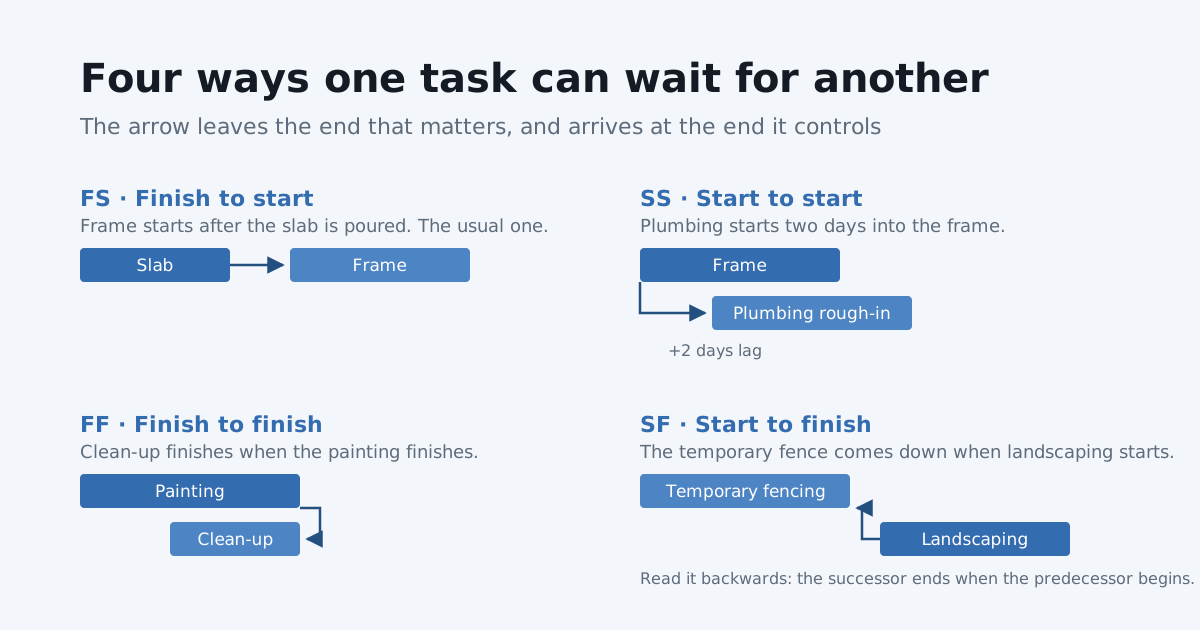
A link has a predecessor (the task being waited on) and a successor (the task doing the waiting). The two letters tell you which end of each task the link attaches to: the first letter is the predecessor’s end, the second is the successor’s.
FS — finish to start
The successor starts after the predecessor finishes.
Example: slab → frame. You cannot stand a frame on concrete that is not there. The frame starts when the slab is done.
This is the one everybody knows, and about 80% of a residential programme is made of it. If you only ever use FS links, you will still have a working schedule. The other three are for the places where FS makes the programme longer than the job really is.
SS — start to start
The successor starts when the predecessor starts.
Example: frame → plumbing rough-in, with two days of lag. The plumber does not need the whole house framed. He needs two days of frame up, and then he can work behind the carpenters.
This is the one that is worth learning, because it is how you overlap trades honestly. Model that as FS and the programme says plumbing starts after the frame is finished — which adds a week you were never going to lose. Builders who do not know SS exist tend to fix this by typing an earlier date in by hand, which works until the frame moves and the plumber does not.
FF — finish to finish
The successor finishes when the predecessor finishes.
Example: painting → final clean. The cleaners are not waiting for the painters to be completely done before they start. They work through, but they cannot be finished before the painters are, because the painters keep making mess.
FF is for the task that runs alongside another and has to end with it: clean-up, supervision, scaffolding down, a site allowance that runs to the end of a stage.
SF — start to finish
The successor finishes when the predecessor starts.
Example: temporary fencing → landscaping. The temp fence stays up until the landscaper arrives. The moment landscaping starts, the fence task is over.
This is the rare one, and the one that confuses people, because you read it backwards: it is the successor that ends when the predecessor begins. Most programmes never need it. It earns its place for things that run until something else kicks off — temporary works, a hire item, a security guard, a site office that stays until the handover crew moves in.
Lag, which matters more than the link type
Lag is waiting time on a link. It is the difference between a programme that reads well and one that survives contact with a building site.
| Between | Lag | Why |
|---|---|---|
| Slab pour → frame | 3 days | Concrete cure |
| Render → paint | 5 days | Drying |
| Order windows → install | 30 days | Lead time |
| Frame → frame inspection | 1 day | Booking the inspector |
A schedule with no lag has the frame starting the morning after the pour. Nobody does that. And the error is not random — it is always in the same direction, so the whole programme is optimistic by the sum of every wait you left out. That is how a job that was never going to finish in sixteen weeks gets promised in sixteen weeks.
Lag on an FS link is the wait after the predecessor finishes. On an SS link it is the wait after the predecessor starts — which is how “two days into the frame” gets written down.
A worked example
Six tasks, one house:
| Task | Waits for | Link | Lag |
|---|---|---|---|
| Site set-out | — | — | — |
| Slab | Site set-out | FS | — |
| Frame | Slab | FS | 3 days (cure) |
| Plumbing rough-in | Frame | SS | 2 days |
| Temporary fencing | Landscaping | SF | — |
| Final clean | Painting | FF | — |
Now the concrete truck cannot get in on the Tuesday and the slab slips two days. The frame moves two days. The plumber moves two days with it, still two days behind the carpenters. The frame inspection moves. Lock-up moves, so the lock-up claim moves, so the money moves — and you knew on the Tuesday, not in week eleven.
That is the entire argument for linking a programme rather than typing dates into it.
How SmarteBuild does it
The schedule carries all four types, with lag on any of them.
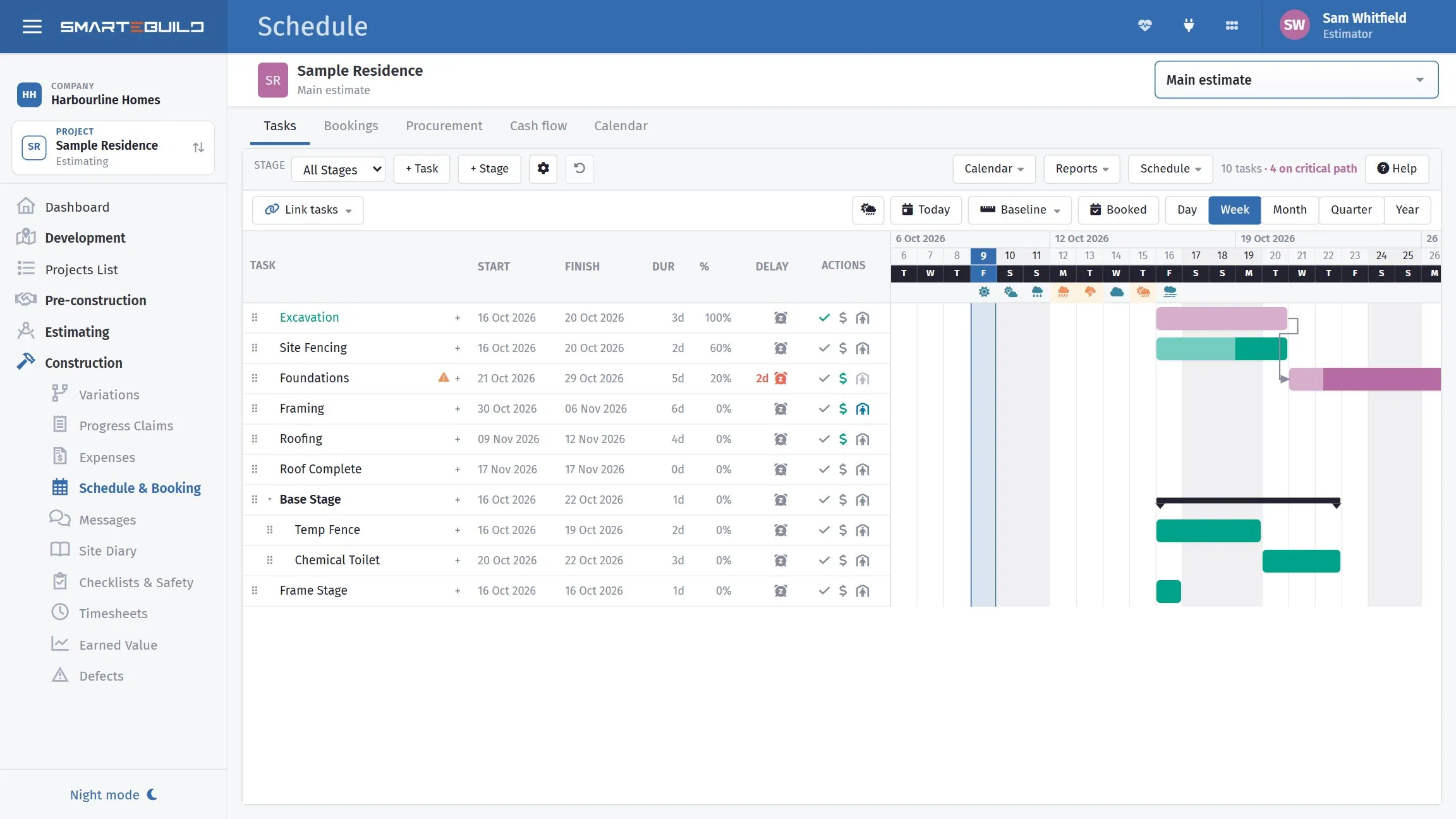
Ten tasks, four of them on the critical path. The arrows between the bars are the links — and the weather sits above the dates, because on a residential job that is half the reason a programme moves.
Linking is a click. Open Link tasks above the Gantt chart, pick the type — each one has a small picture of what it does — then click the first task and the second. Keep going for as many pairs as you like in that type, and press Done.
Changing one is a dropdown. Open a task and go to its Links tab. It lists what it waits for and what waits for it, each with a type box, a lag box, and a plain sentence underneath that reads the link out: “This task starts 2 working days after Slab pour finishes.” Change the type or the lag and the dates move straight away. If you cannot tell SS from FF at a glance, read the sentence — that is what it is there for. You can add one from the same tab: Add a link asks whether the other task comes before or after this one, which task it is, the type and the lag, reads the link back as a sentence, and Link saves it.
The arrows tell you the type. They leave from the start or the finish of one bar and arrive at the start or the finish of the other, so the shape of the arrow is the link. Hover one and it reads out: “Frame → Plumbing: Start to start, +2 days.”
It knows about weekends and weather. Durations are in working days against the job’s own calendar, so a three-day task starting Thursday finishes Monday, and public holidays are already in. Delays are recorded against the task that lost the time, with the reason — which is what an extension-of-time claim is made of.
Already have a programme? Import it. SmarteBuild reads MS Project files — .mpp, .mpx and .xml — with the tasks, all four link types, the lags and the people, and shows you a preview of what will change before anything is written. Export the same way, so a client or a project manager who wants it in MS Project gets it in MS Project. If a job already has tasks, you can update from a newer file instead of replacing it, and the bookings, delays and call-ups attached to the tasks that matched stay where they are.
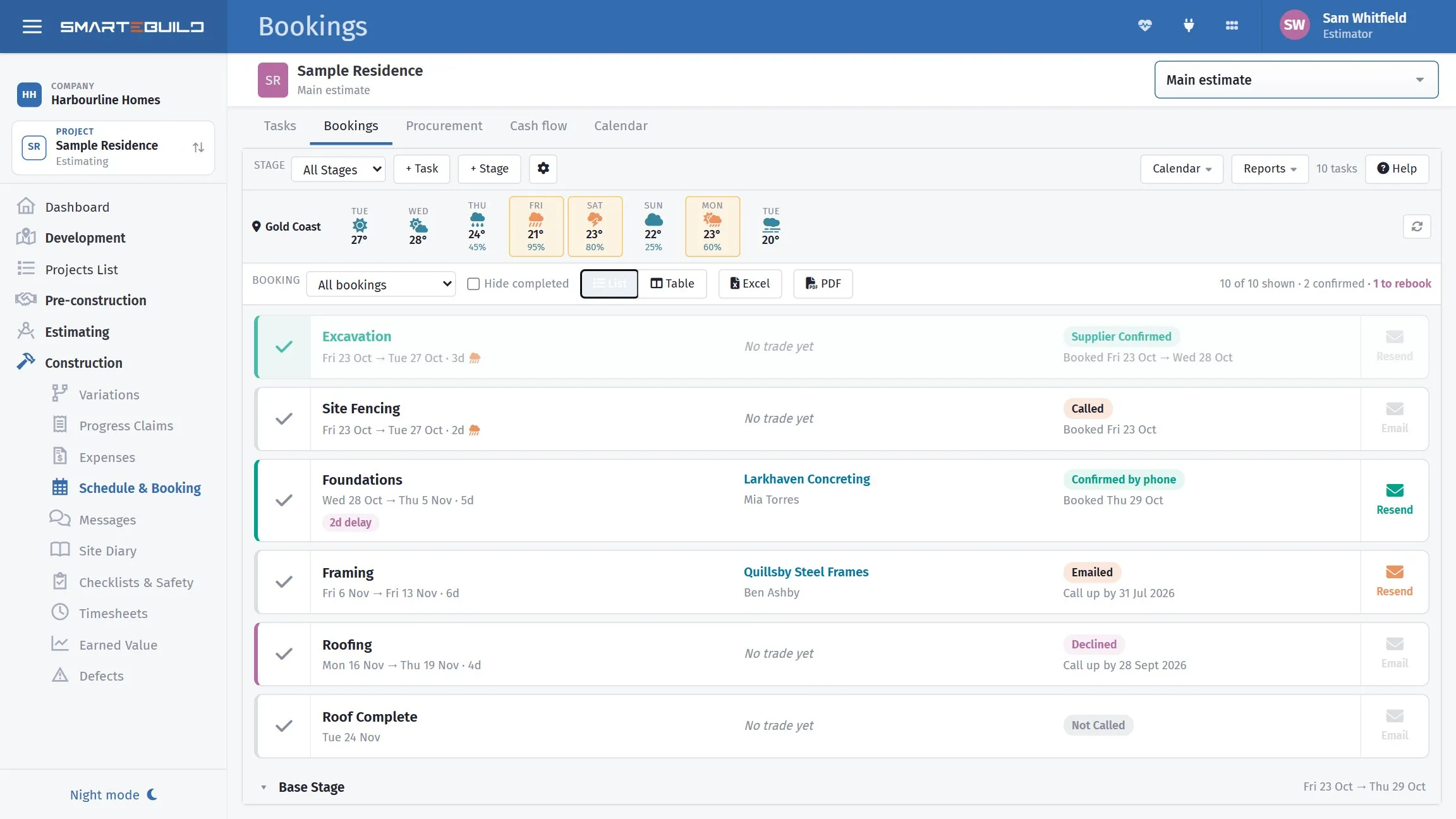
The other half of “who do I ring”. Each task carries its trade and where the booking got to — confirmed, called, emailed, declined, not called yet — so the slab slipping two days is a list of six people, not a morning of phone tag. The one marked declined is the one that would have bitten.
And it is joined to the rest of the job. A task knows its trade, so the call-up sheet for next week comes off the programme rather than being retyped. Dates on the programme drive the procurement dates, so the windows get ordered against their real lead time. And because the stages are on the programme, the cash flow knows when the money falls due.
Where to start
Do not build a two-hundred-line programme. Build twenty tasks, link them honestly, and put real lag on the four or five waits that always catch people out — the cure, the drying, the window lead time, the inspection.
Then move one and watch what happens. If the right things move and the wrong things stay put, the programme is telling you the truth, and you can trust it the next time something slips. Which will be Tuesday.
SmarteBuild is Australian estimating and job management software for residential builders. Try it free for 30 days — no credit card, every module to try.